
Better Video Production Without Repeating Every Step
You may already know that short videos help people notice your products, services, and brand. The problem is not always having ideas. It is turning those ideas into consistent videos without repeatedly filming, editing, correcting, and exporting the same material.
For a small Malaysian business, video production can become a bottleneck. You may need one version for TikTok, another for Instagram, a product demonstration for WhatsApp, and a longer explanation for your website. If a scene changes awkwardly, a person looks different, or the camera movement does not match the next shot, the content can feel unfinished.
Google’s Gemini Omni 1.1 Flash points towards a more controlled approach to AI video creation. Instead of generating a clip and accepting whatever appears, you can provide references, control the opening and closing frames, extend a scene, and review a lower-resolution draft before producing the final version. The model is available through the Gemini API, Google AI Studio, and the Gemini Enterprise Agent Platform.
TL;DR
Gemini Omni 1.1 Flash gives you more control over AI-generated video, including scene extensions, first-and-last-frame guidance, video references, and 4K output.
For your business, the main lesson is simple: plan video as a repeatable workflow. Create a quick draft, check the story and branding, then produce the final version only after the direction is right.
What This Means
Earlier AI video tools often worked like a one-shot generator. You described a scene, supplied an image, or wrote a prompt, and received a clip. If the result was almost right but the ending did not connect to the next shot, you usually had to start again or perform manual editing.
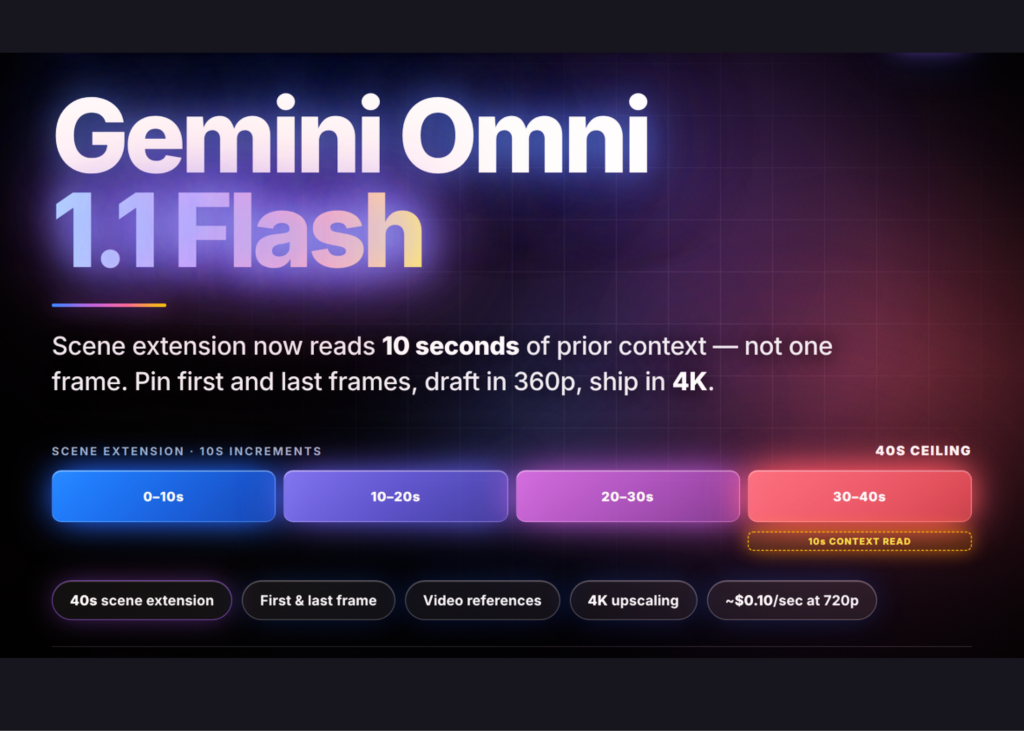
Gemini Omni 1.1 Flash is designed to make the process more directable. According to the source article, scene extension can analyse up to 10 seconds of previous context rather than relying only on the final frame. Extensions can be generated in 3-to-10-second increments and can build towards a cumulative 40-second continuation. This helps preserve movement, setting, and visual continuity.
You can also provide a first frame and a last frame. The model then attempts to create the movement between them. This is useful for a product appearing on a table, a camera moving around a showroom, or a visual transition that must finish in a particular position.
The editing process is conversational and stateful through Google’s Interactions API. In practical terms, you can refer to a previous interaction and request a change without uploading the entire earlier video again. You might ask for the same scene with a slower camera movement, a different background, or a clearer product focus while preserving details you did not ask to change.
The useful shift is not “AI can make a video.” It is “you can give AI a production brief and refine the result without rebuilding everything.”
How This Applies to Malaysian SMEs
If you operate a café, bakery, restaurant, or food manufacturing business, controlled scene generation can help you prepare product-focused content. You could create a short sequence showing a drink being placed on a counter, followed by a close-up of the packaging and a final frame containing your call to action. First-and-last-frame control gives you a way to plan the opening and closing rather than hoping the generated clip lands correctly.
For retailers, fashion sellers, furniture shops, and home-decor businesses, consistency matters. Customers need to recognise the same product across several posts. The model supports up to three video reference clips, with each clip up to three seconds, for likeness and character consistency, according to the reported model limitations. You could use short reference material showing a product, a model, or a display setup, then develop several related scenes around it. However, you should still inspect every output because visual consistency is not guaranteed.
If you run a tuition centre, training provider, property agency, or professional service firm, video extension may help you produce explanatory content. Begin with a presenter or visual demonstration, then extend the scene to show another step. Do not assume the tool replaces your subject-matter knowledge. You still need to provide accurate scripts, Malaysian examples, correct terminology, and clear instructions for viewers.
For businesses serving local communities, language and cultural context require extra care. The source article reports that English is fully supported while other languages are unevaluated. That means you should test Bahasa Malaysia, Mandarin, Tamil, and mixed-language scripts before using them publicly. For important content, have a staff member review pronunciation, spelling, captions, product claims, and the overall tone.
You can also use this approach for internal communication. A small company might create onboarding clips, safety reminders, standard operating procedure demonstrations, or customer-service examples. Drafting in a lower resolution allows your team to focus first on whether the message is understandable. Only after approval should you prepare the final output.
Key Capabilities to Understand
| Capability | What the source reports | Possible SME use |
|---|---|---|
| Scene extension | Up to 10 seconds of previous context; cumulative extension up to 40 seconds | Continue a product demonstration or service walkthrough |
| Frame control | First and last frames can guide the generated movement | Create planned transitions and repeatable opening or closing shots |
| Video references | Up to three clips, with each clip up to three seconds | Maintain references for products, people, or visual style |
| Draft resolution | 360p drafts are reported as up to 60% faster than 720p and use a third of the 720p cost | Review ideas quickly before final production |
| Final resolution | Available response formats include 360p, 720p, 1080p, and 4K | Prepare suitable versions for social media, presentations, or websites |
All figures in the table come from the source article. Treat them as reported product specifications and verify current behaviour in Google’s official documentation before designing a production workflow.
Practical Takeaways
- Start with a shot list. Write down the opening frame, main action, camera movement, spoken message, and closing frame before generating anything.
- Use short drafts first. Review the story, product appearance, text placement, and brand suitability before requesting a high-resolution output.
- Create a reference library. Keep approved product photos, staff reference clips, packaging images, colours, logos, and sample environments in one organised folder.
- Separate creative review from factual review. One person can assess whether the video looks good, while another checks claims, prices, operating hours, addresses, and product details.
- Plan for platform formats. Prepare separate briefs for vertical social content, website banners, presentations, and customer messages instead of stretching one video everywhere.
- Be careful with dialogue. The source article notes that adding new dialogue during extension of an uploaded video with a speaking person is restricted, while spoken dialogue is supported in multi-turn extension through the previous interaction.
- Keep human approval. Do not publish automatically. Check faces, hands, labels, captions, cultural references, and whether the final scene still represents your actual business.
- Record provenance. Generated videos carry invisible SynthID watermarking, which can support identification of AI-generated material, according to the reported release details.
A Simple Workflow You Can Test
- Choose one business objective. For example, explain one service, demonstrate one product, or answer one common customer question.
- Write a 20-to-30-second storyboard. Keep the message narrow and decide what viewers should do next.
- Prepare visual references. Use approved images or short clips of the real product, premises, packaging, or presenter.
- Set the first and last frames. Make the beginning and ending visually specific so the generated movement has a clear direction.
- Generate a draft. Use a lower-resolution preview to inspect continuity and message clarity.
- Refine one issue at a time. Ask for a slower movement, a cleaner background, or better product visibility rather than changing everything at once.
- Approve and export. Produce the final version only after your team confirms the content, branding, and customer information.
The Bigger Picture
This development suggests that AI video tools are moving closer to structured production assistants. The value for a small business is not simply producing more clips. It is creating a process where ideas, references, revisions, and approvals are easier to manage.
That distinction matters because more content is not automatically better content. Your customers still respond to relevance, clarity, trust, and a strong reason to pay attention. AI can help you test different visual approaches, but it cannot decide which product claim is responsible, which local example is appropriate, or which customer concern needs an honest answer.
There are also limitations to plan around. The source article reports that uploaded input videos must generally be 10 seconds or shorter for extension, extensions append only to the end, audio inside video references is ignored, and YouTube URLs cannot be used as a source. The same article also reports that the service is paid-tier only and does not offer provisioned throughput. Check the official Gemini API documentation and official pricing documentation for current availability, limits, and account requirements.
For your SME, the sensible next step is not to replace your entire marketing process. Pick one repeatable video type, such as a weekly product highlight or customer FAQ. Build a small approval checklist, test the workflow with real brand materials, and measure whether your team saves time while maintaining accuracy. If the process works, expand it carefully to other parts of your business.
Ready to Streamline Your Operations?
Your business should run itself. AutoRunBiz deploys AI agents to automate your daily operations — WhatsApp orders, invoicing, customer follow-ups, and accounting. Book a free 15-min ops audit to see where automation fits your business →