
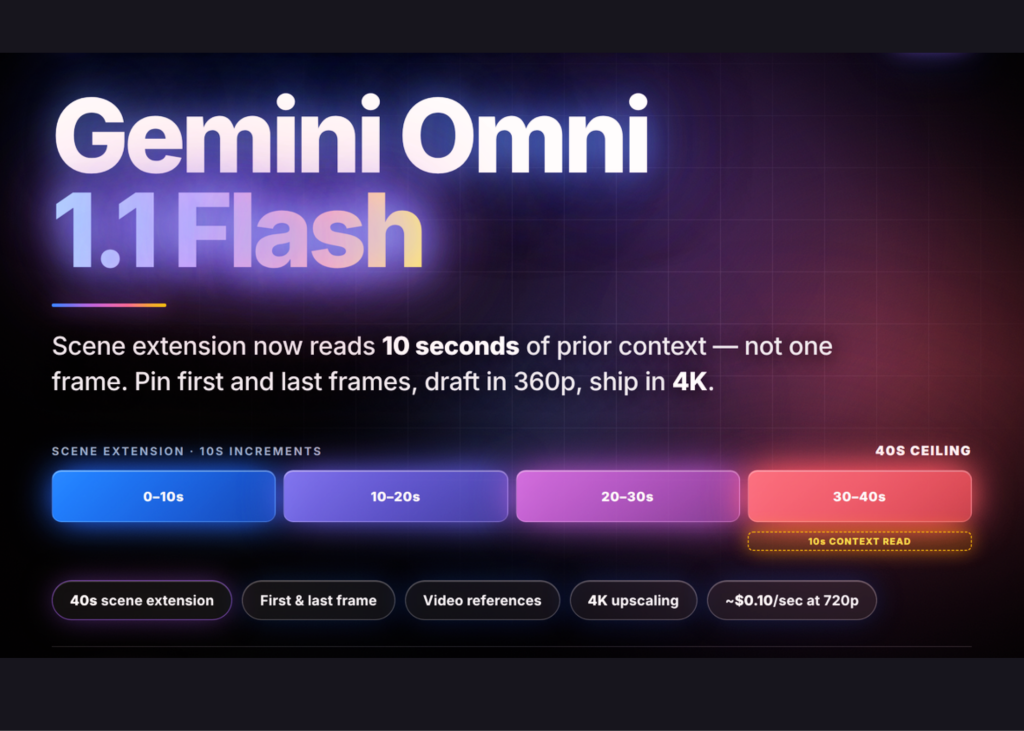
Google’s Gemini Omni 1.1 Flash brings more control to business video
If your business depends on product videos, social media content, online demonstrations or training clips, creating professional video usually involves several rounds of filming, editing and approval. Google’s latest release suggests that this process may become more flexible: you can generate a short scene, extend it, control its opening and closing frames, and prepare a high-resolution final version from a lower-resolution draft.
Google has released Gemini Omni 1.1 Flash, a multimodal video generation and editing model available through the Gemini API, Google AI Studio and the Gemini Enterprise Agent Platform. The release is designed to make AI-generated video more directable rather than relying only on a one-shot prompt.
For you as a Malaysian SME owner, the important question is not whether AI can create impressive video demos. It is whether your team can use these tools to produce clearer product explanations, campaign variations and internal materials without repeatedly starting from zero.
What Happened
Gemini Omni 1.1 Flash adds scene extension that analyses up to 10 seconds of previous video context when continuing a clip, compared with the final second in earlier versions, according to the source report. Extensions are generated in 3- to 10-second increments and can build up to a cumulative 40 seconds. The model adjusts some final frames from the original clip to create a more continuous transition.
There are limits. Scene extension appends content only to the end of a clip. It does not insert a new scene in the middle or add content before the beginning. Uploaded videos must be 10 seconds or shorter unless you are extending a video generated through a multi-turn interaction. The report also notes that new dialogue cannot be added when extending an uploaded video in which someone is speaking.
The update also introduces first-frame and last-frame controls. You can provide an opening image and a closing image, then ask the model to generate the movement between them. Google supports tags such as <FIRST_FRAME>, <LAST_FRAME>, <IMAGE_REF_N> and <VIDEO_REF_N> to identify the role of each media reference. Video references can include up to three clips, with each clip limited to three seconds, and are intended to help preserve character likeness.
Another practical change is the resolution workflow. Gemini Omni 1.1 Flash supports 360p, 720p, 1080p and 4K output options, with 1080p and 4K described as upscaled outputs in the source material. Google reports that 360p drafts can generate up to 60% faster and use one-third of the 720p generation cost, based on its stated system-throughput comparison. The sensible production pattern is therefore to review a low-resolution draft first and create the final high-resolution version only after approval.
For a small business, the main benefit is not “AI video” by itself. It is the ability to make controlled revisions without reshooting every scene.
Why This Matters for Malaysian SMEs
Many Malaysian SMEs need frequent content but do not have a full production department. A local café may need a short video showing a new menu item. A furniture seller may want to demonstrate how a product fits into a room. A tuition centre may need a consistent explanation for parents. A workshop, distributor or professional services firm may want short training clips for staff and customers.
First-and-last-frame control can help with these scenarios. You might provide a starting image of a closed product package and an ending image showing the product in use. The generated movement can connect the two points. A retailer could specify that a camera begins outside a shop and ends at a featured display. A property-related business could use a controlled transition between an exterior view and an interior feature, subject to checking the accuracy of every generated detail.
Scene extension is useful when a short clip has the right opening but ends too soon. For example, you could create a demonstration of a kitchen appliance, then extend the final moment to show the finished dish being served. A service business could begin with a customer problem and extend the scene to show the completed solution. Because the extension uses up to 10 seconds of earlier context, continuity may be easier to maintain than when a system only looks at the final frame.
However, you should treat the tool as an editing assistant, not an automatic fact-checker. Product dimensions, ingredients, safety procedures, business premises and customer claims must be reviewed by a human. If your video includes Bahasa Malaysia, Mandarin, Tamil or local slang, test the result carefully. The source article states that English is fully supported while other languages are unevaluated, so language quality should not be assumed.
Potential SME uses
| Business need | Possible use | What you should check |
|---|---|---|
| Product marketing | Extend a short demonstration or create movement between two product frames | Product shape, labels, colours and specifications |
| Social media | Prepare several short variations from one approved concept | Brand tone, captions and platform format |
| Training | Illustrate a process or customer-service scenario | Operational accuracy and staff privacy |
| Sales presentations | Move from a problem scene to a solution scene | Claims, testimonials and industry requirements |
How You Could Test It
Start with one business objective rather than asking your team to produce an entire campaign. Select a short, non-sensitive clip and define exactly what should remain unchanged. For example: “Keep the packaging design, product colour and table position unchanged. Extend the scene by showing the product being placed beside a prepared meal.” This makes review easier than using a broad prompt.
Next, create a 360p draft for internal approval. Ask your team to check continuity, movement, text, logos and the accuracy of the scene. Only after the concept is accepted should you render the final version at a higher resolution. Keep the original prompt, source media and approved output in a shared folder so another team member can reproduce the process.
Do not upload customer videos, employee footage or confidential product information until you understand the platform’s data handling terms and have the necessary consent. Video references can improve likeness, but they also raise privacy and identity concerns. You should also disclose or label synthetic media where appropriate, particularly when the video could be mistaken for a real event or customer experience.
The Bigger Picture
Gemini Omni 1.1 Flash reflects a wider shift in business AI: the value is moving from generating a single result to maintaining a controlled workflow. The model supports stateful conversational editing through the Interactions API, allowing a later request to refer to an earlier interaction rather than requiring the previous video to be uploaded again, according to the source article.
That approach can fit an SME approval process. You can create a draft, request one specific change, review it, and preserve other approved elements. This is closer to a structured editing workflow than repeatedly asking for a completely new video. It also creates a reason to establish simple internal rules: who approves content, which brand assets may be used, what claims require evidence, and which customer images are permitted.
There are still important gaps. The source reports no support for voice editing, audio references or YouTube URLs as source material. Video references ignore embedded audio, and reasoning across multiple videos may reduce output quality. Generated videos carry invisible SynthID watermarking for provenance, as stated in the report.
Your best next step is a small pilot: choose one product, one audience and one measurable publishing goal. Compare the time needed to create and approve an AI-assisted clip with your existing process. If the tool helps your team revise content while preserving brand consistency, it may become a useful part of your marketing and training workflow. If it produces attractive but inaccurate scenes, keep it limited to concepts until the review process improves.
Ready to Streamline Your Operations?
Technology moves fast. Your operations should keep up. AutoRunBiz builds AI systems that run your daily workflows — from WhatsApp order capture to accounting. Book a free 15-min ops audit →