
It Starts With an Update. Then Your Hardware Dies.
It’s a busy Saturday afternoon at your shop. The queue stretches past the door. You reach for the POS terminal to process a payment — and the screen freezes. Then it reboots. Then it goes black. Two hours later, the technician tells you the terminal is dead. The software update your vendor pushed last week was more than the hardware could handle.
This exact scenario is happening right now — not to a small business, but to Tesla owners at massive scale. And the pattern is a warning that every Malaysian SME that depends on technology should take seriously.
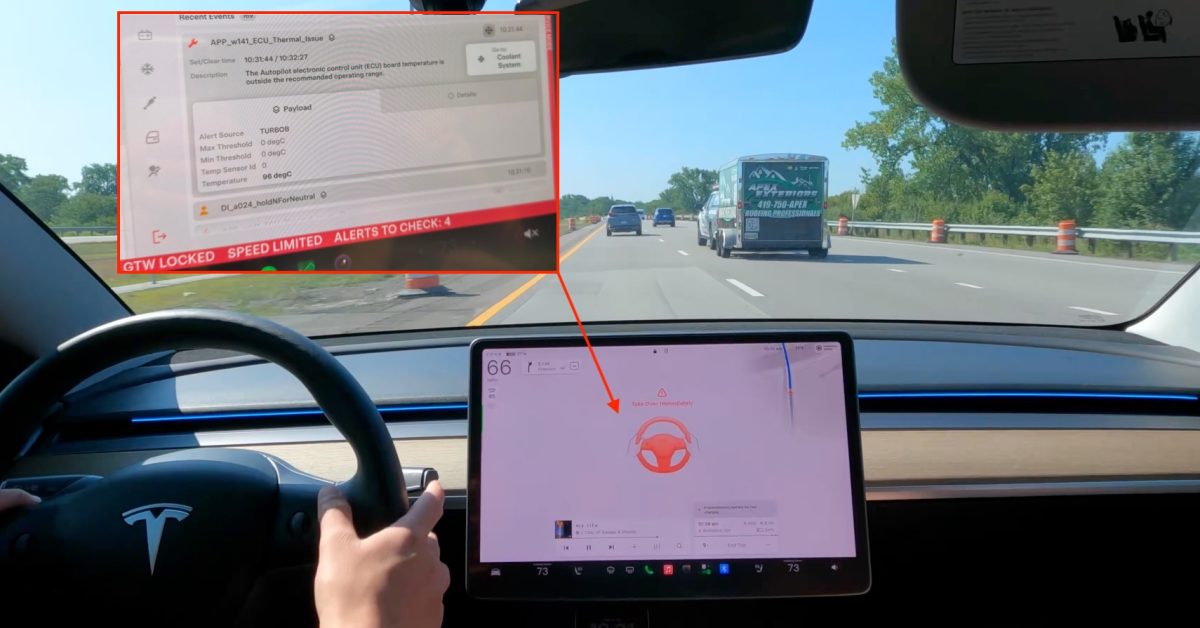
In late July 2026, Tesla pushed a new self-driving software build called FSD v14 Lite to millions of older Hardware 3 (HW3) cars. The software is a “distilled” version of what runs on Tesla’s newer Hardware 4 — squeezed down to fit the older computer’s limited memory. Within two weeks, owners were reporting that their Autopilot computers were overheating, shutting down mid-drive, and in some cases, dying completely and needing replacement.
TL;DR: Tesla pushed a software update to older computers that was too demanding for them. The computers are overheating and, in some cases, failing outright. The same thing can happen to your business systems when a vendor pushes updates your hardware can’t handle. Before you click “Update,” check your hardware’s limits — and know what you’ll do when the update breaks something.
What This Means, In Plain Language
Here’s the background. Tesla sold millions of cars promising full self-driving capability on computer hardware it called HW3. But that hardware was always on the edge — it ships with only 8GB of RAM and roughly one-eighth of the memory bandwidth of the newer HW4 computer. When Tesla later admitted HW3 couldn’t deliver the self-driving features it had promised, it created a “Lite” version of its latest software to run on the older hardware anyway, because HW3 is now 7-year-old hardware.
The result: the overloaded computers are triggering thermal faults when the board climbs above 90°C, with owners measuring 96°C. On the road, the system shows a “red hands” warning, forces the driver to take over, and refuses to re-engage until the computer cools down. In the worst cases, the computer shuts down permanently and needs replacement, according to Tesla Service.
Here’s the critical part: this is software physically damaging hardware. An update meant to add features instead pushed an already-marginal computer past its safe operating limit — and Tesla is already responsible for roughly 4 million HW3 cars it owes a solution for. The company hasn’t confirmed the software is causing the failures. But the timing — alerts clustering right after the update, failures increasing as the rollout expands — is hard to dismiss.
“When a known-marginal computer starts failing right after you push a heavier model onto it, ‘it’s just old cars’ stops being a satisfying explanation.” — Electrek
How This Applies to Malaysian SMEs
Now, you don’t run a self-driving fleet. But replace “Autopilot computer” with “POS terminal,” “accounting laptop,” or “security camera recorder,” and this story is uncomfortably familiar. Malaysian SMEs often run hardware past its comfortable lifespan because it still works. And that’s exactly when vendors’ updates become dangerous — not because the vendor is malicious, but because their roadmap is built around new hardware, not your older device.
Think about the restaurant owner running a POS terminal that’s been reliable for years. The vendor announces new features — online ordering integration, WhatsApp order tracking, real-time inventory. It all sounds great. The update installs. Then the terminal starts lagging during dinner service. It freezes when you try to swipe a card. Eventually, it stops booting altogether. The vendor’s response: your hardware is below the minimum specification for the latest version. You need a new unit. The new features were real — they just weren’t built for the machine you had. Meanwhile, your evening service is disrupted and your team is writing orders on paper.
This is the same situation Tesla owners are living right now — except they number in the millions. The scale exposes how casually a vendor can shift the burden of aging hardware onto the customer. On top of the failures, owners are also reporting broader regressions: phantom braking, hesitation, and brake stuttering that point to the same compute ceiling. Translation for you: when an update is too heavy for your hardware, it doesn’t fail gracefully. It fails messily — and you’re the one cleaning it up.
The trust element matters too. When you bought that system, you probably asked: “Will this last?” The vendor likely said yes — or at least implied it. But nothing about Tesla’s situation suggests vendors will prioritise your aging hardware when it conflicts with their new product roadmap. And critically, many affected cars are out of warranty. Owners are discovering they’re stuck arranging their own replacements. In the SME world, that’s a familiar story: you’re the one dealing with the replacement logistics, the data recovery, and the downtime while your business stalls.
Practical Takeaways: Protect Your Business From Update Failures
- Delay major updates by two to four weeks. You don’t need to be first. Let other businesses test it. If a rollout causes failures, you want to be nowhere near it.
- Check hardware requirements against your actual specs. Don’t assume your device can run it. Check the vendor’s minimum requirements — then check your device’s actual specifications, not what you think they are.
- Watch for physical warning signs. Overheating, unexpected slowdowns, reboots during normal use, loud fan noise — these are your hardware’s distress signals. Investigate before the update, not after.
- Ask your vendor: “What’s the rollback plan?” If an update fails, can you revert to the previous version? If the answer is no, weigh the update’s benefits against the risk of permanent failure.
- Keep a spare device ready. Configure an older unit that can be swapped in immediately if your primary one fails. It doesn’t need to be new — it needs to work.
- Get the vendor’s hardware support policy in writing. How long will they support your current hardware? What happens when support ends? That answer determines when your device’s clock runs out.
| Warning Sign | What Tesla HW3 Owners See | What Your Equipment Might Show |
|---|---|---|
| Overheating | Autopilot computer triggers thermal fault (APP_w141) above 90°C; owners measured 96°C | POS terminal runs hot, fan noise, shutdowns during peak hours |
| Forced shutdown | “Red hands” alert, self-driving disengaged and unavailable until the computer cools | System freezes or reboots mid-transaction at the counter |
| Permanent failure | Computer completely dead; Tesla Service confirms replacement needed | Device won’t power on; technician says it can’t run the latest software |
The Bigger Picture
What’s happening with Tesla is a preview of a broader industry pattern. Software vendors move forward; hardware gets left behind. That’s normal. What’s not normal — and not acceptable — is software that actively damages the hardware it runs on. But the Tesla case shows that when a company pushes an update past its own hardware’s limits, the consequences land on the customer, not the company.
For Malaysian SMEs, the lesson is bigger than any single update. Every technology your business depends on — the POS system, the accounting platform, the cloud phone system
Ready to Streamline Your Operations?
Your business should run itself. AutoRunBiz deploys AI agents to automate your daily operations — WhatsApp orders, invoicing, customer follow-ups, and accounting. Book a free 15-min ops audit to see where automation fits your business →