
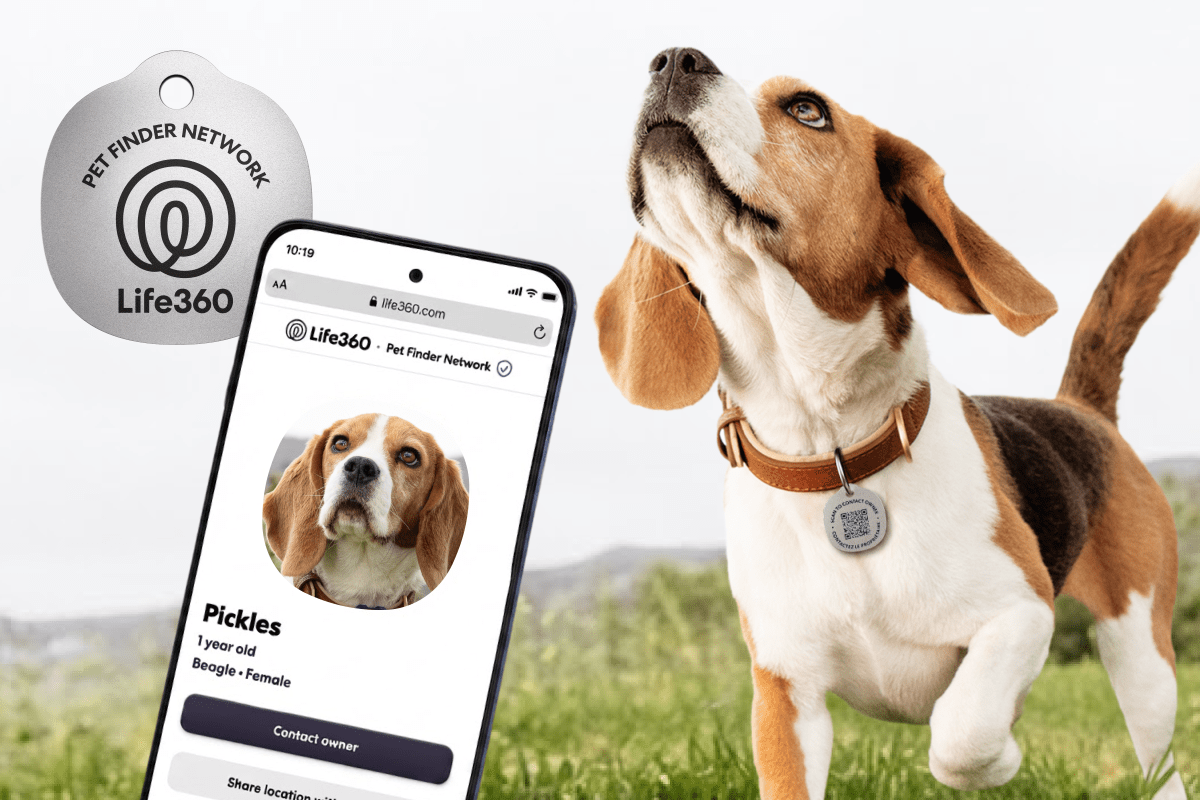
A Small Pet Tag, A Useful Lesson for Your Business
When a customer loses contact with your business, the problem is rarely just one missed message. A delayed reply, incomplete record, or unclear handover can create repeated follow-ups, frustration, and a loss of trust. For a small business owner, these small gaps can take up a surprising amount of your team’s attention.
Life360’s new scannable pet tags offer a simple example of how businesses can reduce those gaps. The tag uses a QR code to help a finder contact a pet’s family, while also alerting the family through the Life360 app. The finder does not need to install the app for the alert to work. TechCrunch reported this feature on 25 August 2026.
The broader lesson is not about pets or tracking devices. It is about creating a clear bridge between an offline item or situation and the people responsible for responding to it.
TL;DR
A QR code can connect a physical object to the right person, record, or workflow without requiring the public to use your internal system.
For Malaysian SMEs, this approach can improve service requests, equipment reporting, delivery coordination, customer support, and staff handovers.
What This Means
Life360’s scannable tag is a low-friction contact point. Someone who finds a lost pet scans the code, sees the relevant contact information, and triggers an alert to the family. The family can update its contact details through the pet profile, so the information does not depend entirely on a permanent printed phone number.
The product also shows how one simple entry point can support several layers of service. The tag handles basic identification. The mobile app handles notifications. The profile stores updated details. GPS tracking, where available, adds location information. Care logs help different family members coordinate feeding, walking, medication, and other routines.
According to Life360, more than 8 million pets had been added to accounts since its pet-tracking expansion. That figure was included in TechCrunch’s report. The important design choice is that the person scanning the tag does not need to become a user first. This removes a common obstacle: asking an outside person to download an app, create an account, or learn a complicated process before help can begin.
Useful insight: Make the first step easy for the person who discovers the problem, then make the follow-up structured for the person responsible for solving it.
How This Applies to Malaysian SMEs
1. Turn physical products into service entry points. If you sell appliances, office equipment, furniture, uniforms, or food products, a QR code can connect the item to useful information. A customer scanning the code might see care instructions, warranty registration, delivery details, or a support form. You can direct the request to the correct person instead of relying on customers to search through old WhatsApp messages or call your main line.
For example, a local air-conditioning service company could place a QR label on each installed unit. The code could open a form showing the customer’s site, installation date, service history, and preferred contact channel. The customer does not need to know which technician handled the previous visit. Your team receives a consistent request with the information needed to act.
2. Improve delivery and collection coordination. Malaysian SMEs often manage deliveries through a mixture of WhatsApp chats, handwritten notes, phone calls, and spreadsheets. A QR code on a delivery document, reusable crate, or collection item can provide a direct route to report damage, confirm receipt, or request follow-up. The person receiving the item only needs to scan and submit the issue.
A bakery supplying cafés, for instance, could attach a code to each delivery crate. The café manager could scan it to confirm receipt or report missing items. The submission could automatically notify the operations team and create a record for checking. This is more reliable than asking staff to remember which group chat contains the latest delivery conversation.
3. Make internal handovers visible. Care logs in the Life360 example allow several people to see whether a task has been completed. Your business can use the same principle for recurring work. A code on a company vehicle could open a daily inspection checklist. A code on a storeroom shelf could open a replenishment form. A code on a machine could show cleaning or maintenance tasks.
This is especially useful when your team works in shifts or when the owner is not present every day. Instead of asking, “Has this been done?”, you can view a shared record. The goal is not to monitor every movement. It is to prevent routine responsibilities from disappearing during busy periods or staff changes.
4. Support customers without exposing private staff details. A business can use a shared service channel rather than printing one employee’s personal number on every label. When staff change roles, you update the contact destination in one place. This helps maintain continuity while keeping personal contact information separate from business communication.
For Malaysian businesses serving customers in multiple languages, the landing page can also offer Bahasa Malaysia, English, Mandarin, or Tamil instructions where appropriate. This creates a more accessible experience without requiring a customer to navigate a complicated website.
Practical Takeaways
Before adding QR-based workflows, choose one problem that happens regularly. Do not begin by placing codes everywhere. Start with a process where people frequently ask for status, report an issue, or need the correct contact person.
- Choose one physical touchpoint: Select a product label, delivery document, equipment item, vehicle, or service card.
- Define the first action: Decide whether the scan should report a problem, confirm completion, request support, or display instructions.
- Keep the form short: Ask only for details your team genuinely needs, such as name, phone number, reference number, issue type, and photo.
- Send alerts to a shared destination: Avoid routing every request to one staff member’s personal device.
- Create an owner for every alert: Someone must be responsible for checking and closing requests.
- Record the outcome: Track whether the matter was acknowledged, assigned, resolved, or requires another visit.
- Update information centrally: Make sure contact details, instructions, and operating hours can be changed without reprinting every label.
- Test the public experience: Scan the code using a phone that does not have your internal app or account access.
- Protect customer data: Show only information needed for the specific task, and review who can access submissions.
A Simple SME Workflow
| Stage | What happens | Business benefit |
|---|---|---|
| Scan | Customer or staff member scans a QR code | No need to search for a contact or form |
| Submit | They choose an issue and add essential details | Requests arrive in a consistent format |
| Alert | The responsible team receives a notification | Less dependence on manual forwarding |
| Assign | A staff member takes ownership | Clear accountability during handovers |
| Close | The outcome is recorded and the customer is updated | Fewer repeated enquiries and lost requests |
The figures and product details in the Life360 example include the launch of $7.99 scannable pet tags and inclusion of GPS trackers in Silver bundles, according to TechCrunch. For your business, the relevant point is not copying its product structure. It is designing a simple public action that connects to a more organised internal process.
The Bigger Picture
Small businesses are increasingly surrounded by digital touchpoints, but adding technology is not enough. The useful systems are usually the ones that fit naturally into existing behaviour. A customer already has a phone. A worker already sees the machine, parcel, or stock item. A QR code places the next action exactly where the problem occurs.
This also changes how you think about automation. Automation does not always mean replacing human judgement. In many SME workflows, it means collecting the right information early, notifying the right person, and keeping a reliable record of what happened. Your staff can then spend less time finding context and more time resolving the issue.
Over time, these small connections can create a clearer operating picture. You may discover which products generate the most support requests, which delivery points have repeated problems, which equipment needs frequent attention, or which tasks are often missed during handover. Those insights can guide training and process improvements.
Start with one label, one form, and one accountable owner. If the process saves your team from repeated calls or missing information, expand it carefully. The best automation for an SME is not the most complicated system. It is the one your customers and employees can use correctly without needing a long explanation.
For Malaysian SMEs, that is the practical lesson from scannable pet tracking: put a simple doorway to help where people need it, then make sure your business is ready to respond behind it.
Ready to Streamline Your Operations?
Your business should run itself. AutoRunBiz deploys AI agents to automate your daily operations — WhatsApp orders, invoicing, customer follow-ups, and accounting. Book a free 15-min ops audit to see where automation fits your business →