
Cloud Speed, Mac Privacy: Why This AI Update Matters
Imagine asking an AI assistant to prepare a sales summary using your customer records, draft a supplier reply from internal documents, and compare it with current market information. The cloud is useful for research and complex reasoning, but your customer names, identification numbers, contracts, and payment details may not be suitable for sending to an external service.
That tension is especially relevant to Malaysian SME owners. You want automation that helps a small team respond faster, organise information, and reduce repetitive work. At the same time, you remain responsible for handling customer and employee data carefully. Perplexity’s new hybrid compute approach offers a practical glimpse of how AI tools may combine cloud intelligence with local processing on your own computer.
What Happened
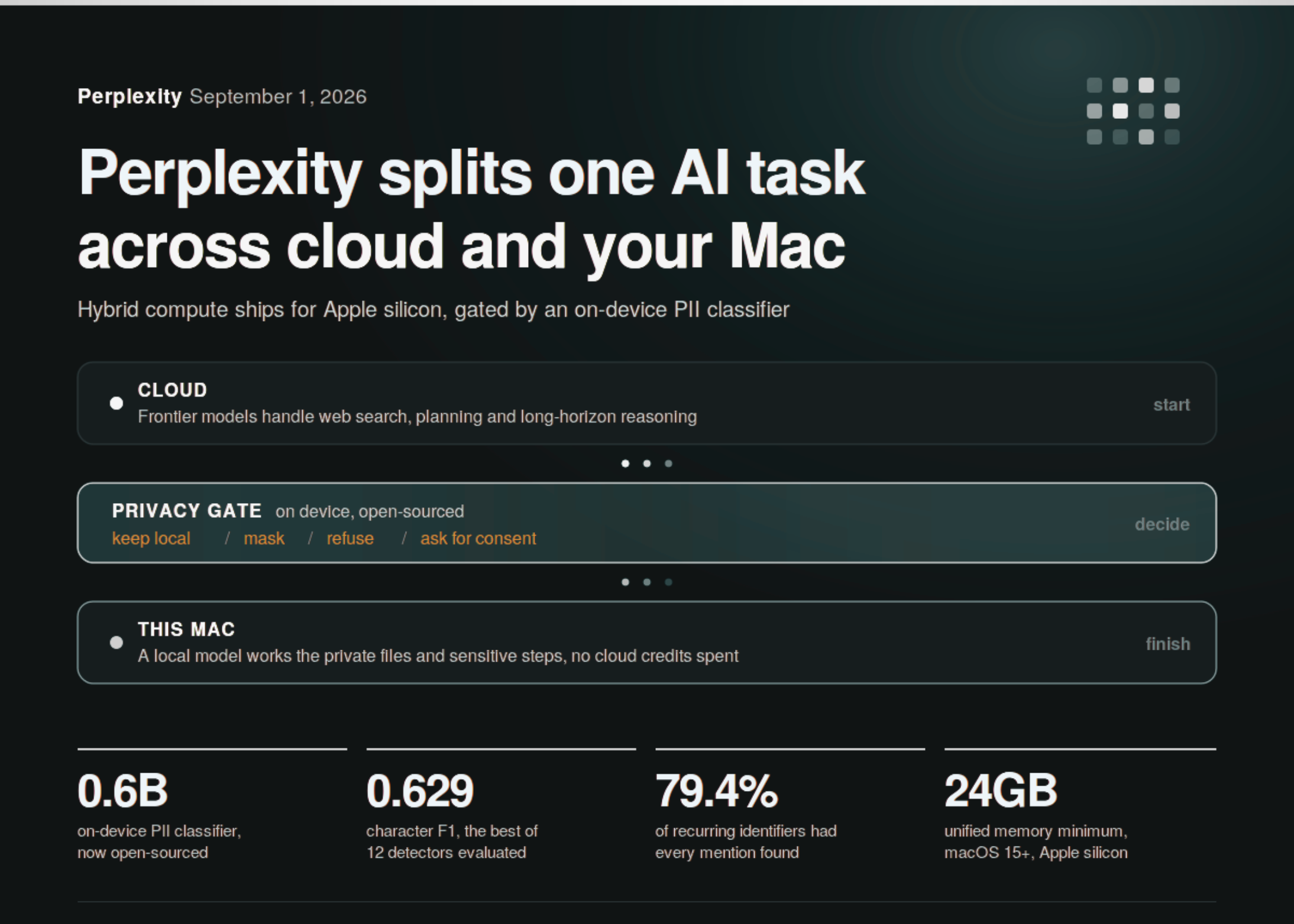
Perplexity has introduced hybrid compute for its Perplexity Computer product on Apple silicon Macs. According to Marktechpost’s report, a task begins with cloud-based models handling web searches, planning, and longer reasoning. When a step involves private files or sensitive information, that step can be passed to a local model running on the Mac, without restarting the task or losing its context.
The key control is an on-device privacy gate. Before protected information is allowed to leave the computer, a classifier checks the content and chooses one of four actions: keep the information local, mask sensitive sections, refuse the action, or request user consent. The system is designed to identify information such as credentials, payment card numbers, and government identification details. Perplexity has also open-sourced the classifier behind the gate, according to the same source article.
The feature is available to Pro, Max, and Enterprise subscribers using an Apple silicon Mac with macOS 15 or later and at least 24GB of unified memory, with 32GB recommended, as reported by Marktechpost. The local model can be installed from the Mac application, and local work does not use cloud credits, according to the report.
Why This Matters for Malaysian SMEs
Many Malaysian businesses operate with lean teams. A property agency may need to summarise tenancy documents while checking current regulations. A logistics company may want to review delivery records and prepare customer updates. An accounting or advisory practice may need to organise client documents before producing a management report. In each case, the useful answer may require both private business information and external research.
A hybrid design gives you a clearer way to divide that work. The cloud can handle broad research, planning, and general language tasks. The local computer can process confidential portions such as customer lists, internal quotations, staff information, or contract details. The result is not automatically risk-free, but it creates a technical boundary that is easier to understand than sending every document to a cloud assistant.
For example, you could ask an AI system to compare a private supplier agreement with publicly available delivery standards. The agreement could remain on the office Mac while the cloud component researches public information. If the system supports masking, names or identification numbers could be replaced with stand-ins before a limited portion is sent out. Your team should still review the output and confirm that the tool’s controls match your internal policies.
This is also relevant to Malaysian data-handling responsibilities. The Personal Data Protection Act 2010 provides the legal framework for personal data protection in commercial transactions in Malaysia. A privacy gate does not replace legal advice, access controls, retention policies, or proper consent. It can, however, become one layer in a broader process for deciding what an AI application may read and where that information may go.
Useful applications to consider
| SME workflow | Cloud role | Local role | Control to require |
|---|---|---|---|
| Customer service | Draft a general reply and find product information | Read the relevant private case record | Mask contact and identity details |
| Sales proposals | Research industry trends and structure the proposal | Use internal pricing and customer requirements | Approval before external sharing |
| Operations | Plan tasks and compare public guidance | Review internal schedules and incident reports | Keep employee data local |
| Document review | Summarise general clauses or explain terminology | Process confidential agreements | Audit logs and role-based access |
What the Privacy Gate Can and Cannot Do
The reported classifier, called PII-Tracer, is a 0.6-billion-parameter model trained to identify sensitive information. The source reports that it uses 37 labels covering nine personal-information types and a 4,096-token window. On the PII-TRACE benchmark, it achieved a character F1 score of 0.629 and found every mention of recurring identifiers in 79.4% of evaluated cases, according to Marktechpost.
Those figures are useful for understanding the engineering challenge, but they are not a guarantee that every sensitive item will be detected in your business documents. The report also says recall declined from 0.975 for conversations shorter than 1,000 characters to 0.687 for conversations of 10,000 characters or more. Overlapping sliding windows improved character recall to 0.965 in the reported test. Long contracts, mixed-language messages, scanned documents, and unusual internal codes may still produce errors.
A privacy gate should be treated as a checkpoint, not as permission to stop thinking about privacy.
Your implementation should therefore use layered controls. Begin with a small set of low-risk documents. Remove unnecessary personal information before it reaches any AI tool. Restrict which staff can access the local model. Require human approval for emails, financial decisions, employment matters, and legal documents. Keep a record of what was processed, which model handled it, and whether information was masked or blocked.
The Bigger Picture
Perplexity’s release points towards a more flexible AI architecture. The important idea is not simply “cloud versus local”. Instead, one workflow can use different computing locations for different steps. Public research may be handled remotely, while confidential extraction or classification happens on a company device. That is closer to how many SMEs actually work: some information is public, some is commercially sensitive, and some is personal.
The direction of control also matters. This product reportedly starts in the cloud and moves sensitive steps to the Mac. Perplexity had earlier shown an opposite approach on NVIDIA DGX Spark, where work begins locally and escalates to cloud models with permission, as described in the source article. These two patterns give businesses a useful question to ask: should your default be convenience first, or privacy first?
For a Malaysian SME, the answer may depend on the workflow. A marketing team researching public topics may be comfortable with a cloud-first process. A clinic, legal practice, recruitment agency, or financial services provider may prefer local-first handling for sensitive records. Enterprise controls such as organisation-wide rules and audit logs, which Perplexity says are available for Enterprise users, may become increasingly important as AI agents gain access to more business systems.
How You Can Prepare
- Map your information: separate public, internal, confidential, and personal data.
- Choose a pilot: start with a repetitive workflow that has limited consequences if the draft is wrong.
- Set boundaries: define which documents must remain on a local device and which require approval.
- Test detection: use realistic Malaysian names, phone numbers, addresses, identity references, and mixed Bahasa Malaysia-English text.
- Keep people accountable: require staff to verify AI-generated summaries, messages, and recommendations.
- Review suppliers: check retention, access, audit, security, and data-processing terms before connecting business systems.
Hybrid compute will not solve every privacy or governance issue, but it gives you a more practical design option. The strongest use of AI in your business will come from matching each task to the right environment, protecting sensitive information by default, and keeping a responsible person in the loop. That is the direction worth watching as AI assistants move from answering questions to carrying out real business work.
Ready to Streamline Your Operations?
Technology moves fast. Your operations should keep up. AutoRunBiz builds AI systems that run your daily workflows — from WhatsApp order capture to accounting. Book a free 15-min ops audit →