
Stop Treating Every Business Video Like a Full-Length Film
You may already have hours of useful video sitting in your business: staff training recordings, product demonstrations, sales presentations, customer interviews, safety briefings, webinars and meetings. The problem is not creating the videos. The problem is finding the one important detail when you need it.
If someone asks, “Which part explains the refund process?” or “At what point does the trainer show the machine settings?”, your team may have to watch the recording from beginning to end. That wastes attention and makes valuable knowledge difficult to reuse. For a small business, the issue becomes more serious when only one or two experienced employees know where everything is.
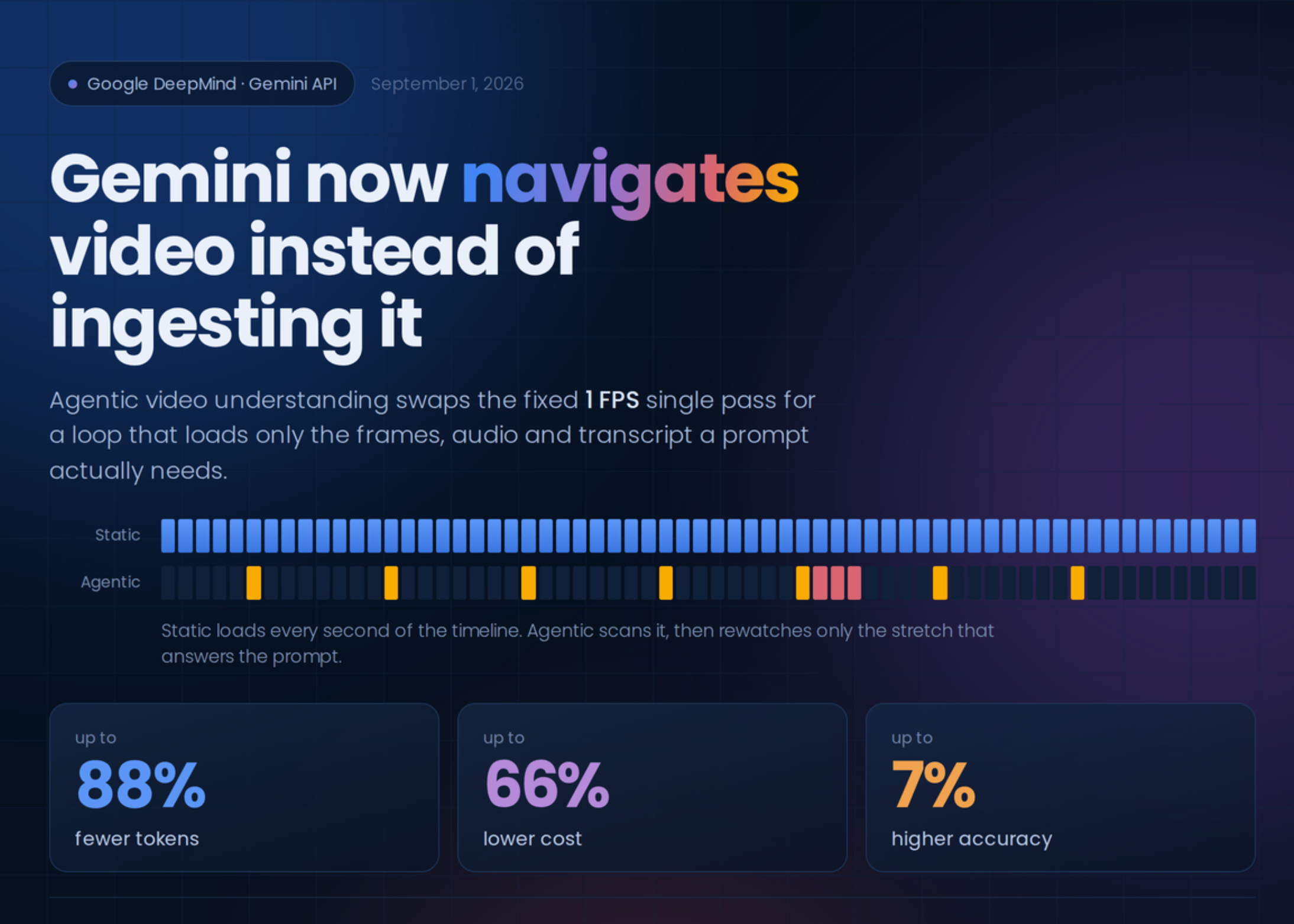
Google has introduced agentic video understanding for selected Gemini Flash models. Instead of processing every second of a video in the same way, the model can decide which sections, frames, audio segments or transcripts it needs to inspect for a particular question.
TL;DR: Gemini’s agentic video feature lets the model search and inspect relevant parts of long videos instead of loading the entire timeline equally. Google reports up to 88% fewer tokens, up to 66% lower processing cost and up to 7% higher accuracy on its video benchmarks; these figures are from Google’s own evaluations, not a guarantee for every business workflow (source).
What This Means
Traditional video analysis usually follows a fixed approach. The system samples video at a set rate, such as one frame per second, processes audio and creates timestamps across the timeline. This is straightforward, but it treats a five-minute product clip and a two-hour training session in roughly the same mechanical way.
Agentic video understanding adds a decision-making loop. The model first considers your question, then requests the parts of the video that are likely to contain the answer. It may inspect a transcript, examine a particular time range, review visual frames or listen more closely to a segment. It can repeat this process until it has enough information to respond.
For example, if you ask for the three main announcements in a keynote, the model does not necessarily need to inspect every frame at the same level of detail. If you ask when a specific pricing slide appears, it can search for the relevant spoken phrase or visual content and focus on that section.
Google says the feature is available through its hosted Gemini API and Google AI Studio, as well as the Gemini Enterprise Agent Platform. It supports uploaded files and public YouTube URLs. There are no open model weights to install on your own server, so you would use Google’s online services rather than running the feature entirely on your premises (source).
The response can also include processing steps. A processing_call shows that the model requested a video segment or transcript, while a matching processing_result shows that the material was loaded. This can help a developer display progress or audit how the answer was produced. The reported token accounting separates reasoning tokens from tool-use tokens, giving technical teams more visibility into how the request was handled (source).
The practical idea is simple: ask the system to find the useful moment, instead of asking your employees to search the whole recording manually.
How This Applies to Malaysian SMEs
1. Turn staff training recordings into a searchable internal guide. Suppose you operate a retail outlet, workshop, clinic, logistics company or food business. You may record onboarding sessions for new employees, but those recordings are often forgotten after the first week. An AI video assistant could answer questions such as, “How do I close the cash register?”, “What should I check before opening the kitchen?” or “Which section explains the customer complaint procedure?” This is particularly useful when employees work in shifts and cannot attend every briefing live.
2. Make product demonstrations easier for sales and support teams. A Malaysian SME selling equipment, software, home products or industrial components may have long demonstration videos. Your sales team might need a quick explanation of installation, maintenance or product limitations before speaking to a customer. Rather than replaying the entire demonstration, they can ask for the relevant time range or a short summary. You can also create a question-and-answer library from your existing videos, subject to checking the answer before sharing it externally.
3. Review customer calls and service footage more consistently. If your business records consultations, service visits, training sessions or customer interviews with the necessary permission, video search can help identify recurring issues. You might ask which sessions mention delivery delays, which demonstrations show a faulty step or where customers raise a particular feature request. For a small team, this provides a more practical way to spot patterns without assigning someone to watch every recording manually.
4. Support multilingual teams across Malaysia. Your employees or customers may use Bahasa Malaysia, English, Mandarin, Tamil or mixed workplace language. Video analysis can be useful when instructions are delivered verbally and employees need a written summary. However, you should test transcription quality for your actual accents, terminology and code-switching. A human should review safety instructions, legal statements and customer-facing translations before they are treated as official.
5. Improve meeting follow-up without relying on memory. A recorded management meeting can contain decisions, action items and unresolved questions. You could ask the system to identify decisions, name the responsible person and list deadlines. Treat the result as a draft for confirmation, not as an automatic record. This is especially important when a meeting involves confidential employee matters, customer information or commercially sensitive plans.
Where You Should Be Careful
Agentic processing does not mean the system understands everything perfectly. It may miss a visual detail, misunderstand a speaker, confuse similar product names or produce a confident answer from incomplete evidence. Static processing may still be better for short clips under five minutes or tasks requiring frame-by-frame precision, according to the supplied source article (source).
You also need a clear policy for recorded material. Before uploading a video, check whether it contains personal data, customer conversations, identity documents, payment details, passwords, private addresses or confidential business information. Obtain appropriate consent where required, restrict access and decide how long recordings should be retained. Do not upload sensitive footage simply because it is convenient.
For Malaysian businesses, consider the obligations that may apply under your internal privacy policies and relevant personal data requirements. Your accountant, company secretary, lawyer or privacy adviser can help you assess a specific workflow. Technology should support your governance process, not replace it.
Practical Takeaways
- Start with one video category: choose training recordings, product demonstrations or meeting archives rather than attempting everything at once.
- Use clear questions: ask for a procedure, timestamp, decision, speaker or visual demonstration.
- Keep a human review step: verify safety, compliance, contractual and customer-facing answers.
- Test short and long recordings separately: compare results on a short clip and a longer session before choosing a standard workflow.
- Protect confidential information: remove unnecessary personal data and control who can access generated summaries.
- Record useful metadata: include the date, department, topic, language and version of each video.
- Build a simple question library: save frequently asked questions so employees can find consistent answers.
- Check the processing mode: technical teams can inspect the response steps to confirm whether agentic processing was used (source).
A Simple Pilot Plan
| Stage | What you do | Suggested measure |
|---|---|---|
| 1. Select | Choose one internal video collection and remove sensitive material. | One business process |
| 2. Prepare | Label videos with topic, date, language and owner. | Complete metadata for every pilot video |
| 3. Test | Write common questions your employees already ask. | At least 10 representative questions |
| 4. Review | Compare answers with the original video and correct mistakes. | Human approval before circulation |
| 5. Deploy | Give a small group access through a controlled workflow. | One department or team |
The figures in this table are implementation checkpoints for a practical pilot, not performance claims about Google’s system. The source article reports that Google evaluated agentic video understanding across long-form material, including recordings from 10 minutes to several hours (source).
The Bigger Picture
The long-term significance is not limited to faster video summaries. Businesses are gradually moving from storing files to building systems that can answer questions about those files. Video becomes part of your operational knowledge, alongside documents, emails, images and spreadsheets.
For an SME, this could reduce dependence on individual employees who remember where information is kept. A new staff member may be able to ask a practical question and receive a starting point from an approved recording. A manager may be able to review customer feedback more systematically. A service team may find the exact demonstration needed during a customer conversation.
Still, the best results will come from combining automation with sensible business controls. You need organised recordings, clear ownership, sensible access rules and a review process for important answers. The technology can search a messy archive, but it cannot decide which instructions are still current or whether a manager has approved a policy change.
For your business, the right next step is not to upload every recording. Choose one repeated information problem, test whether video search solves it, and document the boundaries. If your team spends time replaying long videos to find small details, agentic video understanding may be worth evaluating as part of a controlled automation project.
Ready to Streamline Your Operations?
Your business should run itself. AutoRunBiz deploys AI agents to automate your daily operations — WhatsApp orders, invoicing, customer follow-ups, and accounting. Book a free 15-min ops audit to see where automation fits your business →