
When Helpful AI Starts Listening at Work
You may already use messaging apps, video calls, cloud documents and customer relationship tools every day. Now, wearable devices and AI assistants are making it easier to capture spoken information, summarise conversations and retrieve something said moments earlier. For a busy business owner, that sounds useful—especially when meetings move quickly and important instructions are easy to forget.
But there is another question you need to answer before introducing listening features at work: does everyone in the conversation know what the device is doing? A watch or phone may look harmless, yet a short audio capture can become a written note, summary or business record. That affects staff, customers, suppliers and visitors who may not expect their words to be processed.
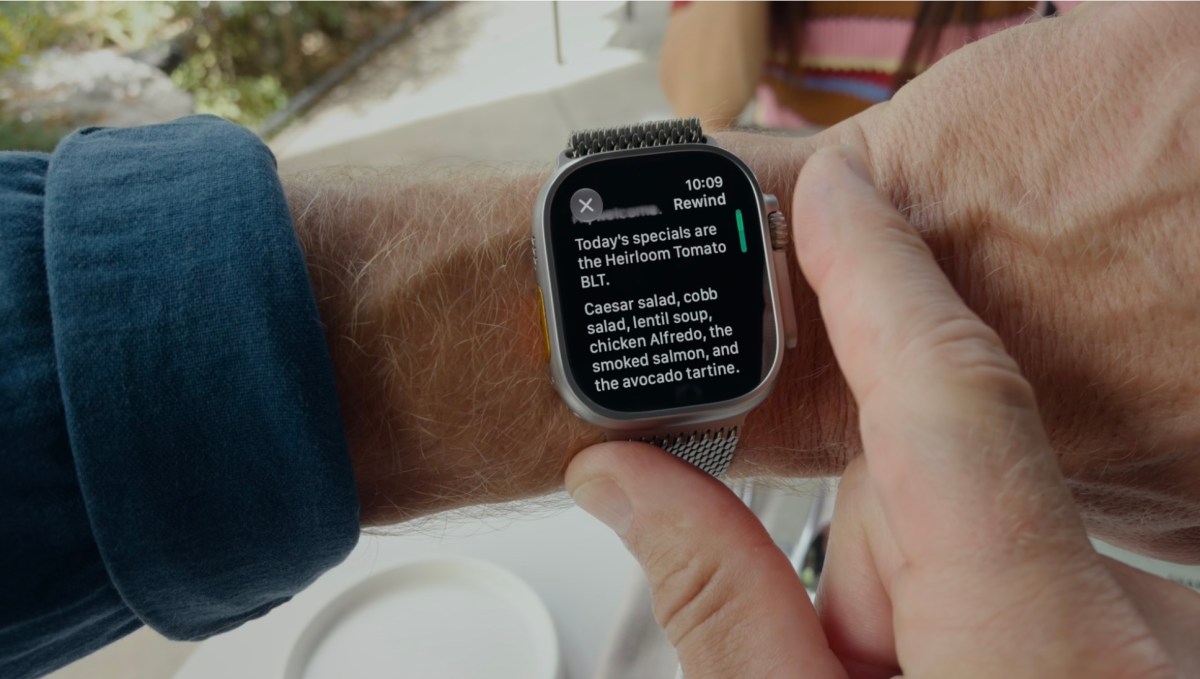
Apple’s reported features provide a useful example. The company describes Audio Intelligence for recognising sounds such as alarms, sirens and doorbells. It also introduces tools that can rewind a short portion of speech or create high-level summaries of conversations. The article says the features can process audio on the device, avoid storing raw recordings and protect generated information with encryption. Source: TechCrunch
TL;DR
AI listening tools can help you capture meeting actions, but they also create consent, privacy and access risks.
Set a clear workplace rule: obtain consent, limit where the feature is used, protect summaries and delete them when they are no longer needed.
What This Means
“Always listening” does not necessarily mean a device is continuously saving every conversation. Some tools listen for a specific trigger, process sound locally or keep only a short temporary buffer. Others create a transcript or summary only after you activate them. Apple says its Siri Recap feature is not automatically enabled all the time, and that users can switch it on or off through settings. The company also says raw audio is not stored and speakers are not identified. Source: TechCrunch
For your business, the important point is not whether a device is technically recording every second. The important point is that spoken information can be transformed into business data. A conversation with a customer may become a summary. A staff discussion may become a list of assigned tasks. A supplier’s informal comment may be copied into a system and shared later.
This creates three practical concerns:
- Consent: people may not know that their speech is being captured or summarised.
- Accuracy: AI summaries can omit context, misunderstand accents or assign the wrong speaker or action.
- Control: once a summary exists, you must decide who can view it, how long it is kept and whether it can be forwarded.
The technology may be designed for accessibility or convenience, but its workplace impact depends on how you introduce and govern it.
How This Applies to Malaysian SMEs
Consider a Malaysian renovation contractor meeting a homeowner at a project site. The owner may use a watch to remember tile preferences, revised timelines and outstanding questions. That could reduce mistakes, but the customer may not realise a device is converting the conversation into notes. If the summary incorrectly states that the customer approved a design change, the business could face an avoidable disagreement. A simple opening statement—“I’d like to use an AI note-taking feature so I don’t miss your instructions; is that all right?”—creates clarity before the conversation begins.
For a retail or food business, listening features may appear useful during staff briefings. You could capture opening duties, stock reminders or customer-service instructions without assigning someone to write notes. However, employees may discuss personal matters, health information or workplace concerns in the same space. Make sure the feature is used only for a defined meeting, rather than left active throughout the shift. The summary should go only to the relevant manager and staff members, not automatically to every device connected to the business account.
Professional service firms face a different risk. An accounting practice, recruitment agency, clinic-related supplier or legal support business may handle identity details and confidential client information. A casual conversation can contain names, identification details, account information or sensitive family circumstances. Under Malaysia’s Personal Data Protection Act 2010, organisations handling personal data should take privacy and security responsibilities seriously. You can review guidance from the Personal Data Protection Commissioner before selecting or deploying AI tools. Source: Personal Data Protection Commissioner Malaysia
Remote teams also need a consistent rule. If one employee uses a smartwatch in a meeting while another uses an AI transcription application on a laptop, people may not know which system holds the resulting notes. Create one approved process for recording, summarising, naming and storing meeting information. This is especially important when staff work with customers in different countries, because consent and privacy expectations may differ.
A Simple Control Framework
You do not need a complicated technology policy to begin. Use a small set of controls that employees can understand and follow.
| Situation | Recommended action | Reason |
|---|---|---|
| Internal planning meeting | Tell attendees before enabling the feature | People know how the notes will be created |
| Customer consultation | Ask for clear permission and explain the purpose | Prevents surprise and supports trust |
| Public counter or open shop floor | Do not use ambient summaries by default | Unrelated people may be captured |
| Confidential discussion | Disable listening tools and take manual notes | Reduces exposure of sensitive information |
| Completed project | Delete summaries that are no longer required | Reduces unnecessary stored business data |
The table is a practical starting point, not a substitute for reviewing your obligations. If your business handles sensitive or regulated information, seek advice appropriate to your industry and review the latest Malaysian requirements. Source: Personal Data Protection Commissioner Malaysia
The right question is not “Can this device listen?” It is “Should it listen here, for this purpose, with these people, and for this long?”
Practical Takeaways
- Choose specific situations where AI summaries are genuinely useful, such as project meetings or action-item reviews.
- Tell everyone before activating a listening or transcription feature.
- Explain what is captured: live audio, a short rewind, a transcript or a summary.
- Give people a simple way to decline without being disadvantaged.
- Turn off listening features in open customer areas, private discussions and sensitive consultations.
- Assign one person to manage access to generated notes.
- Check AI summaries against the original context before treating them as instructions or evidence.
- Do not use an AI note as the sole record of a contract, approval or dispute.
- Set a deletion schedule for summaries, transcripts and exported notes.
- Train staff not to forward meeting summaries through personal accounts or public chat groups.
How to Introduce It Without Confusing Your Team
Start with a short pilot involving one internal meeting type. For example, use the tool only for a weekly operations meeting. Tell attendees what will happen, where the notes will be stored and who can access them. Ask whether the summary accurately reflects decisions and whether anyone felt uncomfortable with the process.
Next, create a one-page rule using plain language. State when listening features are allowed, when they are prohibited and what staff should say before enabling them. Avoid vague instructions such as “use responsibly”. A better rule is: “Ask for permission before recording or summarising any conversation with a customer, supplier or visitor.”
Finally, review the tool’s settings. Look for controls covering microphone access, automatic activation, cloud synchronisation, sharing and deletion. A privacy-friendly setting is not automatically a privacy-safe business process. Someone still needs to check how employees use it and whether old summaries remain accessible.
The Bigger Picture
Listening AI will likely become less noticeable as it appears in watches, phones, earbuds and workplace software. That makes workplace etiquette more important, not less. Visible recording may prompt people to ask questions; subtle capture can pass unnoticed. Your reputation may depend less on whether you adopt the newest feature and more on whether people trust you to use it fairly.
For Malaysian SMEs, this trend favours businesses that treat AI as an assistant under human control. Use it to reduce forgotten tasks, not to monitor every conversation. Use summaries to support decisions, not to replace judgement. And keep the purpose narrow: collect only what you need, protect it properly and remove it when the work is done.
The strongest policy is also the easiest for your team to remember: announce it, ask permission, limit the purpose and protect the notes. That gives you the convenience of AI while respecting the people whose words help your business operate.
Ready to Streamline Your Operations?
Your business should run itself. AutoRunBiz deploys AI agents to automate your daily operations — WhatsApp orders, invoicing, customer follow-ups, and accounting. Book a free 15-min ops audit to see where automation fits your business →