
Why AI Search Can Still Feel Slow and Unhelpful
You may already have documents, product records, customer messages and internal procedures stored across cloud drives, accounting systems, chat applications and websites. The difficulty is not always finding a place to store information. It is helping your staff find the right answer quickly when they need it.
AI search can make that easier by converting text into numerical representations called embeddings. These representations help a system match a question with relevant information, even when the wording is different. However, the quality of the answer depends on more than the AI model. The supporting infrastructure must process documents efficiently and respond quickly to live questions.
Perplexity’s engineering team has described how its embedding system, supporting pplx-embed, handles those workloads on GPUs. The details may sound highly technical, but the business lesson is practical: reliable AI search requires good data preparation, sensible system design and efficient handling of both bulk indexing and live requests.
TL;DR
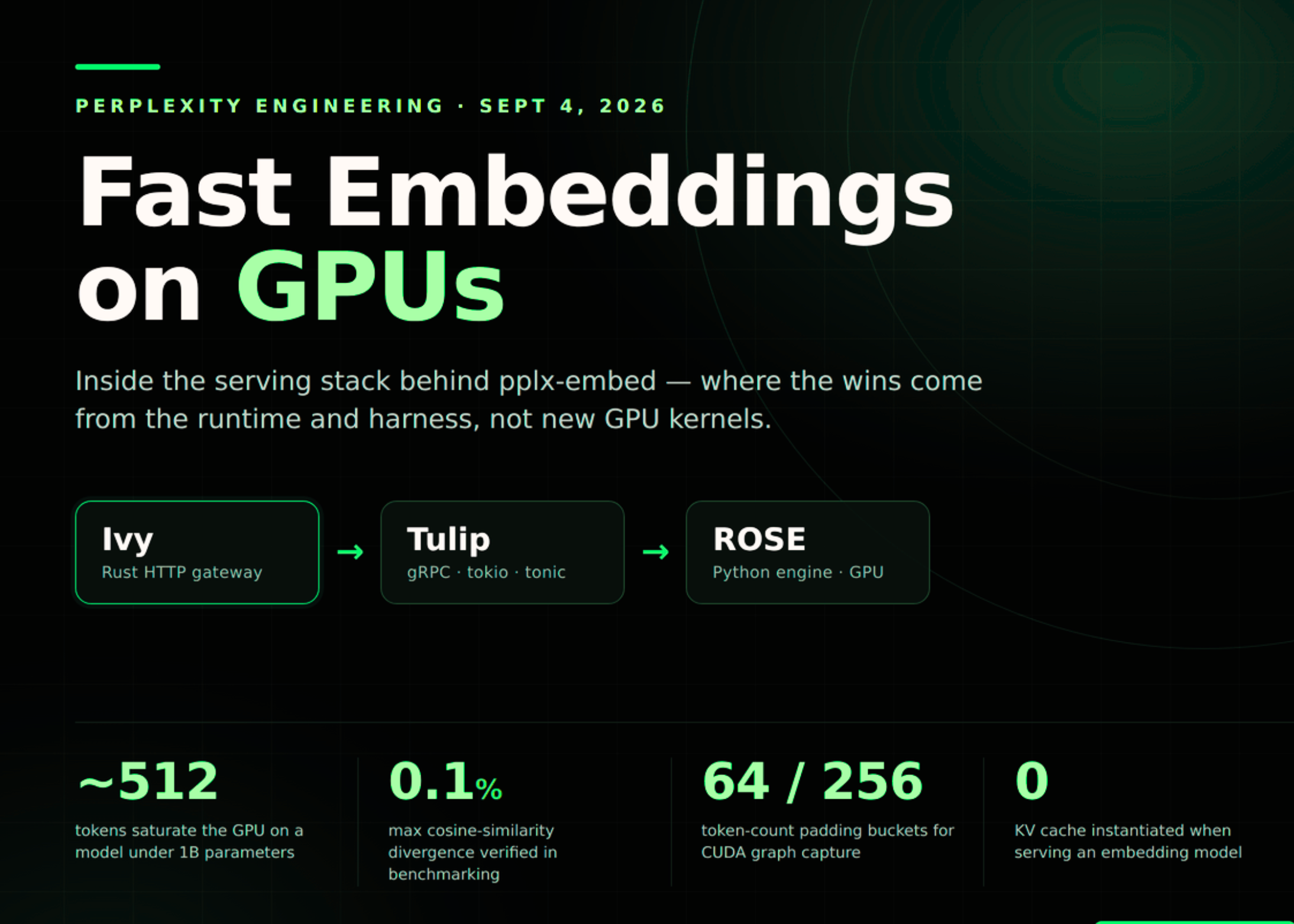
Perplexity uses three services— Ivy, Tulip and ROSE—to prepare requests, schedule work and run embedding models. Its system treats bulk document processing and live question answering as different workloads while reusing the same underlying AI engine.
For your SME, the takeaway is to plan AI search around response speed, data organisation and operational reliability, rather than choosing a model based only on its headline capabilities.
What This Means
An embedding model changes text into a mathematical representation that captures meaning. For example, a customer asking “Can I exchange an item after opening the packaging?” may be matched with a policy titled “Product return conditions,” even though the words are not identical.
Before an AI search assistant can answer questions, your documents normally need to be processed and placed into a searchable index. This is called batch embedding. It is useful when you upload a new set of product manuals, re-index a knowledge base or update a large collection of records.
When a user asks a question, the system converts that question into an embedding and searches for related content. This is called online embedding. The response needs to be fast because a delay of several seconds can interrupt a sales conversation or frustrate a staff member.
Perplexity separates the supporting work into three layers. Ivy handles incoming requests and preparation such as tokenisation, request splitting and load balancing. Tulip manages communication, scheduling and batching. ROSE runs the actual model inference and GPU operations.
The source article reports that Perplexity found latency was more closely connected to the number of tokens processed than the number of individual sequences. Its testing found that approximately 512 tokens could saturate a sub-billion-parameter embedding model in a particular serving setup. Source: MarkTechPost
Useful business insight: Faster AI search is not only about buying a more powerful model. It is also about sending cleaner, shorter and better-organised information through the system.
How the Three-Part Design Works
1. Ivy prepares the work
Ivy is described as a Rust-based HTTP gateway. It receives requests, parses JSON, prepares text, splits large batches and sends work to available replicas. For a business application, this is similar to a receptionist who checks every request, divides a large job into manageable pieces and directs it to the right team.
2. Tulip schedules the work
Tulip acts as the inference server interface. It receives requests through gRPC, groups suitable work together and decides when to dispatch it. The system uses a relatively simple first-come, first-served approach. This avoids unnecessary scheduling complexity when the workload is predictable.
3. ROSE runs the model
ROSE, or Runtime-Optimized Serving Engine, performs the model inference. It manages model definitions, GPU kernels and CUDA graphs. The system also uses asynchronous result handling so the CPU can prepare the next batch while the GPU is still processing the current one.
Perplexity also uses lazy capture for CUDA graphs. Instead of preparing every possible configuration before serving begins, the system first runs a configuration normally and captures it after the configuration appears again. According to the source article, this spreads startup work over time instead of forcing several minutes of preparation at launch. Source: MarkTechPost
How This Applies to Malaysian SMEs
For a distributor or wholesaler, better embedding infrastructure can improve product and stock enquiries. Your team may receive questions such as “Which replacement filter fits the older unit?” or “Do we have the black model suitable for outdoor use?” The relevant information may be spread across catalogues, supplier documents and previous quotations. A properly prepared search assistant can bring those sources together, provided the product names, specifications and stock information are kept current.
For a service business, it can reduce repeated internal questions. A cleaning company, maintenance contractor or technical service provider may have standard operating procedures, job checklists, safety guidance and escalation rules. Staff working at a customer site could search for the correct procedure instead of calling a supervisor for every issue. However, you should still control access carefully, especially where documents contain customer information or operational details.
For an accounting, consultancy or professional services firm, document retrieval is often more important than conversation. Your staff may need to locate a previous proposal, engagement checklist, regulatory reference or client-specific instruction. An AI search tool can help identify relevant passages, but it should show the source document and date. This allows a manager to verify the answer before it is sent to a client.
For an online retailer, fast online embedding can support customer service and sales. A website assistant could match questions about delivery areas, warranty coverage, product compatibility and usage instructions to approved information. You should not allow the assistant to invent return rules or promise stock availability. Live data such as inventory, delivery status and order records should come from the relevant business system.
For a local SME with a small IT team, the architecture suggests a practical priority. You do not need to recreate Ivy, Tulip and ROSE. Instead, you need to ask whether your chosen AI platform can handle both bulk document indexing and live user questions, whether it supports Malaysian business workflows, and whether it provides monitoring, access control and source citations.
Practical Takeaways
- Separate bulk work from live work. Schedule large document indexing during quieter periods and keep customer-facing search responsive.
- Clean documents before indexing. Remove duplicate files, expired policies, blank pages and unclear filenames.
- Keep information in smaller sections. Break long manuals into headings, procedures and frequently asked questions so search results are more precise.
- Use source links or citations. Staff should be able to check the document behind an AI answer.
- Set access rules. A sales employee should not automatically see payroll records, private contracts or another customer’s files.
- Test real questions. Use examples from WhatsApp enquiries, service calls, quotations and staff requests rather than generic demonstrations.
- Measure response quality. Track whether users find the right document, whether answers require correction and how often the assistant cannot answer.
- Keep live information connected. Product stock, order status and appointment availability should be retrieved from current systems whenever possible.
- Start with one department. A focused pilot in customer service or operations is easier to review than a company-wide rollout.
Useful workload comparison
| Workload | Typical SME example | Main requirement | What to monitor |
|---|---|---|---|
| Batch embedding | Indexing a product catalogue or staff handbook | Throughput and reliable processing | Files completed, duplicates and failed records |
| Online embedding | Answering a customer or staff question | Low response delay | Response time and answer relevance |
| Scoring | Choosing the best results from many matches | Accurate ranking | Whether the top result solves the request |
| Access control | Searching shared company documents | Correct permissions | Unauthorised visibility and audit records |
The source article describes four benchmark groups covering low-latency embeddings, low-latency scoring, high-throughput embeddings and high-concurrency embeddings. It also states that tests included tokenisation and network overhead for the concurrency measurements. Source: MarkTechPost
Questions to Ask Your Technology Provider
- How are documents split, updated and removed from the search index?
- Can the system process a large initial document collection without slowing live users?
- Does every answer show the supporting source and document date?
- Can you restrict results by department, role, branch or customer?
- What happens when the system is uncertain or cannot find an approved answer?
- Can it connect to your existing CRM, helpdesk, website, inventory or document storage?
- How are failed imports, outdated documents and duplicate records reported?
The Bigger Picture
The long-term lesson is that AI applications will increasingly depend on the systems around the model. A strong language model cannot compensate for outdated procedures, inconsistent product names or poorly controlled access. Similarly, a useful embedding model can still feel slow if requests are prepared inefficiently or if the application sends unnecessary text.
Perplexity’s approach also shows why one design may serve several workloads. The company reuses prefill and decode kernels from its broader language-model stack rather than building a completely separate embedding engine. Source: MarkTechPost For an SME, the equivalent principle is to avoid creating isolated tools for every department. A shared, well-governed knowledge layer can support customer service, operations, sales and management reporting.
You should also expect AI search projects to become more operational over time. Success will depend on who owns document updates, how quickly incorrect information is corrected and whether employees trust the results. Assign a person to review important sources, define which answers require approval and make it easy for users to report a wrong result.
The practical starting point is not a complicated GPU stack. It is a clear business problem, a controlled document set and a small group of real users. Once you know which questions consume the most staff time, you can choose an AI search solution that handles both the information and the workflow around it.
Ready to Streamline Your Operations?
Your business should run itself. AutoRunBiz deploys AI agents to automate your daily operations — WhatsApp orders, invoicing, customer follow-ups, and accounting. Book a free 15-min ops audit to see where automation fits your business →