
Why Your Office Is Losing the Cable War
Walk through your office on a typical morning and count the chargers. The sales laptop plugged into the only wall socket behind the counter. The accountant’s phone charging from a power bank because the socket is too far. The spare adapter in the meeting room that doesn’t fit anyone’s laptop. In a Malaysian SME with five to fifty employees, chargers multiply faster than the headcount — and every one of them is fighting for the same few wall sockets.
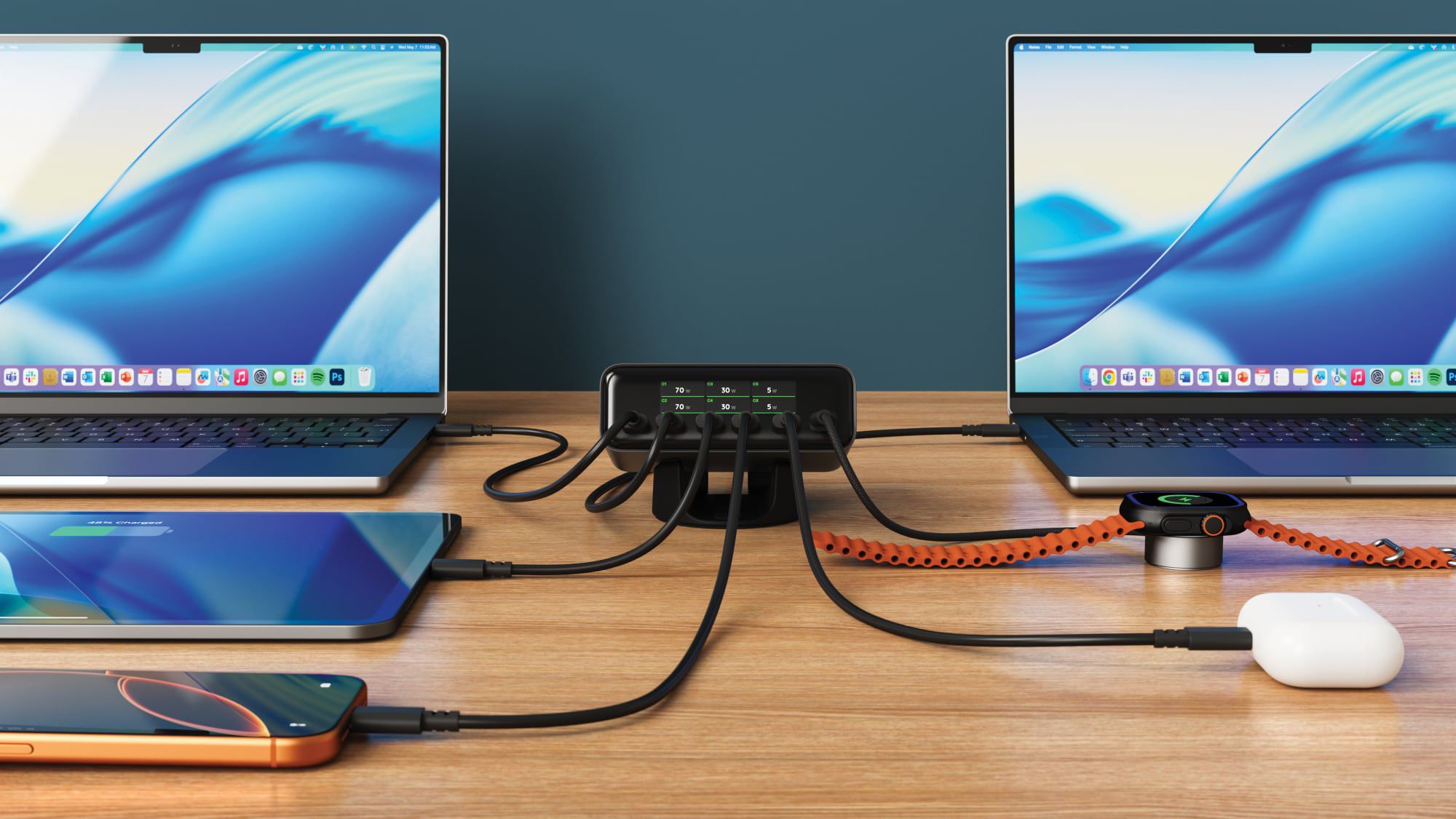
That’s not just messy. It’s wasted time: the “who unplugged my charger” conversation, the hunt for a free socket before a client call, the slow-charging panic at 4pm. Satechi’s ChargeView 240W Desktop Charger attacks that problem directly: one wall plug, six USB-C ports, and a small LCD screen that shows you, live, how much power each connected device is drawing.
TL;DR: The ChargeView 240W splits up to 240W across six USB-C ports. Two ports can each push 140W for large laptops, two more can do 100W each, and the last pair handles 30W each for phones and accessories. The built-in display shows real-time wattage per port. For a small Malaysian office, that means one socket can power a whole team’s devices — and you can finally see which devices are charging fast and which are crawling.
What This Means, In Plain Language
A desktop charger is a box that sits on your desk and plugs into the wall once. From that single connection, it powers multiple devices. The ChargeView 240W does this with six USB-C ports. The two main ports, C1 and C2, can each deliver up to 140W — enough for a large laptop. Ports C3 and C4 can deliver up to 100W each. Ports C5 and C6 provide up to 30W each. These are maximums, and the actual wattage depends on how many ports you use at once.
Here’s the full breakdown from MacRumors’ report:
| Port | Maximum Power | What It Can Handle |
|---|---|---|
| C1 | Up to 140W | Large laptops (16-inch MacBook Pro class) |
| C2 | Up to 140W | Large laptops |
| C3 | Up to 100W | Standard laptops and tablets |
| C4 | Up to 100W | Standard laptops and tablets |
| C5 | Up to 30W | Phones, earbuds, watches |
| C6 | Up to 30W | Phones, earbuds, watches |
| All six in use | 70W / 70W / 30W / 30W / 20W / 20W | Mixed load across a team |
That “up to” matters. When you plug in a new device, the charger redistributes power, which can cause a momentary interruption in charging for other devices. It’s not a fault — the charger is just rebalancing its load.
The LCD display is where this gets useful. It shows the live wattage of every port that’s in use. When you plug your phone in and see it pulling 5W instead of 20W, you know instantly that the cable is the problem — no trial and error, no guesswork.
The technology behind it matters for Malaysian conditions too. This unit uses GaN (gallium nitride), which lets it stay compact, and it has no fan, so it runs completely silently according to Satechi. No fan also means no dust accumulation and no high-pitched hum in a quiet office.
“A charger with a screen sounds like a gadget for early adopters — until you’re the person trying to explain why the boss’s laptop isn’t fast-charging before a client pitch. Then it’s just clarity.”
How This Applies to Malaysian SMEs
Think about a typical small office today. Your team runs a mix of equipment: a Windows laptop here, a MacBook Air there, iPhones, Android phones, wireless earbuds, maybe a tablet for the field staff. Every one of those devices shipped with its own charger, and none of them fit each other’s devices. A six-port hub changes that equation. One unit on a shared desk or a central bench means the charger stays put, the cables are already there, and nobody has to bring their own brick to work.
Now think about your shared spaces. Malaysian offices commonly have one meeting room — and often one wall socket that’s awkwardly positioned. The result is a power strip balancing on the table edge, or someone’s laptop plugged in at an uncomfortable angle. A desktop charger with an included stand can sit vertically or horizontally on the table, power every device in the room from one connection, and run silently. When clients are in the room, the last thing you need is a cable-orientation puzzle before your presentation starts.
And let’s talk about the weather. Malaysia is hot and humid year-round, and small offices in shop lots, converted homes, or ground-floor units don’t always have ideal airflow. Devices run hot, and so do the chargers that feed them. Because this charger uses GaN technology and has no fan, it manages heat better than older charger designs while making no noise at all. In a room of five or ten people, a single extra source of heat and hum genuinely affects comfort by the end of the day.
Finally, consider hot desking. If your team rotates workstations, or your front counter is shared across shifts, give each station one central charger. Staff can walk in, plug in their phone and laptop, check the wattage display, and head out for a delivery or site visit knowing their devices are actually charging — not pretending to.
Practical Takeaways
- Set up one central charging station — front desk, meeting room, or shared workstation — with a six-port hub instead of scattered individual chargers.
- Use the wattage display to diagnose cable problems. If a phone pulls 5W on a 30W port, the cable is the bottleneck, not the charger.
- Match ports to devices: C1 and C2 (140W) for large laptops, C3 and C4 (100W) for standard laptops, C5 and C6 (30W) for phones and accessories.
- Expect a brief interruption when a new device is plugged in. It’s the charger reallocating power — give it a few seconds before you assume something is wrong.
- Use the included stand to mount it vertically and keep desk space clear.
- Plug it into a surge-protected outlet, especially during thunderstorm season, to protect everything connected to it.
The Bigger Picture
The ChargeView 240W sits in the middle of a bigger shift: USB-C is becoming the single standard for powering almost everything. Laptops, phones, tablets, earbuds, even monitors are moving toward one cable type. For SME owners, the practical consequence is that chargers are turning into shared infrastructure rather than personal accessories. You no longer need one charger per device — you need good power stations strategically placed around the office.
The wattage display is also a preview of where charging hardware is headed: transparent, informative, and quiet. Over the next few years, multi-port chargers will become as standard in offices as Wi-Fi routers. The businesses that sort out their charging setup now are saving their staff from daily friction — a small fix that has an outsized effect on how an office feels at 4pm on a busy day.
Ready to Streamline Your Operations?
Your business should run itself. AutoRunBiz deploys AI agents to automate your daily operations — WhatsApp orders, invoicing, customer follow-ups, and accounting. Book a free 15-min ops audit to see where automation fits your business →