
Why Your Business Needs Better AI Guardrails
You may already have employees using ChatGPT or other AI tools to draft emails, summarise documents, prepare customer replies, translate text, or brainstorm marketing ideas. Often, this happens before anyone has agreed on the rules.
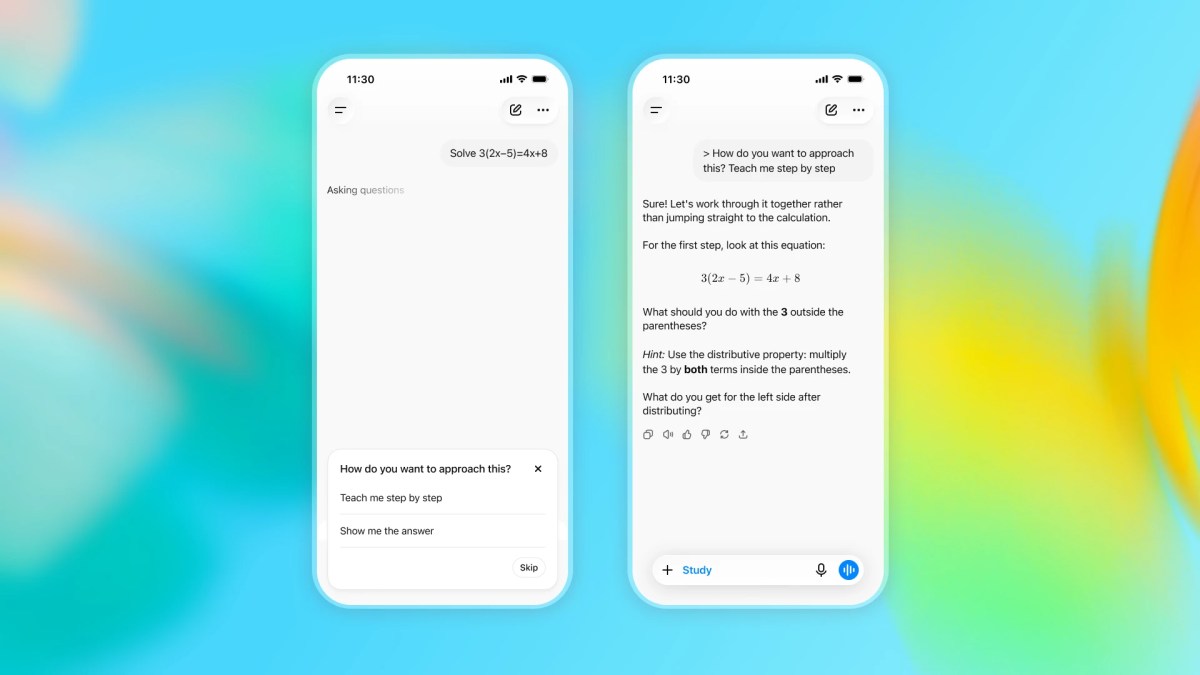
That creates a familiar management problem: the tool is useful, but you may not know what information staff are entering, whether the answers are reliable, or whether people are using AI to avoid learning the work themselves. The same concerns now appear in education, where OpenAI has introduced ChatGPT for Teens with features intended to encourage learning rather than simply provide answers.
The lesson for your business is not that you need a special “teen” version of AI. It is that useful AI needs clear boundaries, guided workflows, human review, and appropriate controls from the beginning.
TL;DR
OpenAI’s ChatGPT for Teens adds safety controls, Study Mode, quizzes, learning visualisations, homework reminders, and parental settings. TechCrunch reported these features and the wider concerns around teen AI use.
For your SME, apply the same thinking: define approved uses, protect sensitive information, require human checking, and design AI workflows that help staff build capability instead of blindly copying answers.
What This Means
ChatGPT for Teens is designed to make AI assistance more age-appropriate and educational. Instead of immediately producing a completed answer, its Study Mode is intended to use guiding questions and step-by-step support. It can also provide quizzes and learning visualisations, while parents or guardians can manage settings such as when Study Mode is enabled by default.
The product also includes protections intended to reduce exposure to harmful or developmentally inappropriate content. OpenAI says these protections are based on its Under-18 Principles in the Model Spec and informed by developmental science and expert guidance. The source article describes OpenAI’s stated approach and the family controls available to parents.
However, safeguards are not the same as certainty. Teenagers may try to work around restrictions, and it remains unclear how difficult that will be in practice. That point matters to business owners too: a setting or policy is only useful if people understand it, follow it, and if you periodically check whether it works.
The practical lesson: Do not treat AI as an answer machine. Treat it as a supervised assistant that should improve thinking, consistency, and productivity.
How This Applies to Malaysian SMEs
1. Build a safe AI workflow for customer service. Imagine your staff member pastes a customer complaint into an AI tool and asks for a reply. The draft may be helpful, but the original message could contain a phone number, order details, address, or other personal information. A sensible workflow is to remove unnecessary personal details first, ask AI to draft a polite response, and require a staff member to check the facts before sending it through WhatsApp, email, or your CRM.
This approach is especially useful for Malaysian SMEs serving customers in several languages. You can ask AI to prepare versions in Bahasa Malaysia, English, Mandarin, or Tamil, but a person familiar with your customers should check tone, meaning, and cultural context. The goal is not to let AI speak without supervision; it is to help your team respond more consistently.
2. Use guided assistance for staff training. A new employee in a retail, service, logistics, or administrative role may ask AI to complete a task without understanding the process. Instead, create prompts that make AI act like a coach. Ask it to explain the steps, identify missing information, quiz the employee, or review a draft against a checklist. This is the workplace equivalent of Study Mode.
For example, a junior staff member preparing a quotation can ask AI to identify whether the document includes the customer name, product description, delivery terms, validity period, and payment instructions. The employee still makes the final decision, but the tool helps build good habits. This reduces dependence on one experienced person and makes onboarding more structured.
3. Separate low-risk work from sensitive work. You can generally begin with low-risk tasks such as brainstorming social media themes, improving grammar, creating internal checklists, or turning a meeting transcript into action items. Sensitive tasks require more care, including payroll, employee records, customer identification documents, supplier contracts, bank information, legal matters, and confidential business plans.
Create a simple traffic-light system. Green tasks may use approved AI tools freely within your company rules. Amber tasks require anonymisation and manager review. Red tasks should not be entered into public AI tools unless your chosen system and internal controls specifically support that use. Keep the instructions short enough that busy employees will actually follow them.
A Simple SME AI Control Model
| Task category | Example | Required control |
|---|---|---|
| Green | Rewrite a generic product description | Staff review before publishing |
| Amber | Draft a reply to a complaint | Remove unnecessary personal details and obtain human approval |
| Red | Process confidential employee or customer records | Do not use an unapproved public AI tool |
This table is an internal operating guide rather than a legal classification. You should also consider your contractual duties, industry requirements, and applicable Malaysian privacy obligations when deciding how information is handled.
Practical Takeaways
- List approved AI uses: Start with five to ten routine tasks that AI may support.
- List prohibited inputs: Include passwords, identity documents, confidential contracts, private employee information, and unnecessary customer data.
- Require human review: AI-generated content should not automatically become a customer promise, financial decision, HR action, or public statement.
- Use coaching prompts: Ask AI to explain, question, test, and review instead of only producing a finished answer.
- Create a verification checklist: Check names, dates, figures, product details, legal claims, and Bahasa Malaysia wording before use.
- Assign an owner: One person should maintain your AI guidelines, collect staff feedback, and review new tools.
- Train through real examples: Show staff a safe customer-service prompt and an unsafe prompt containing unnecessary personal information.
- Review usage regularly: Ask where AI saves time, where it creates errors, and which processes need better controls.
A Practical 30-Day Starting Plan
- Week one: Speak with your team and identify where they already use AI. Do not assume you know all the tools or tasks.
- Week two: Choose two low-risk workflows, such as email drafting and internal document summarising. Write the approved process in one page.
- Week three: Add review checklists and run a short training session using examples from your business.
- Week four: Review the results. Keep what works, remove unnecessary steps, and decide whether another department can adopt the same approach.
Do not begin by trying to control every possible AI use. Begin with the tasks that occur often, affect customers, or involve sensitive information. A small, practical policy is more effective than a long document nobody reads.
The Bigger Picture
The release of a teen-focused AI experience shows that expectations around responsible AI are becoming more specific. A single chatbot experience may not suit a student, a customer-service agent, a manager, and a child. Different users need different levels of guidance, access, review, and protection.
For SMEs, this means AI adoption will gradually become less about asking, “Can this tool do the task?” and more about asking, “How should this task be designed so the tool helps without creating avoidable risk?” That is an operational question, not a technical one.
Businesses that build guided workflows will also be better positioned to develop their people. When AI explains a process, asks useful questions, and checks a draft, staff can become more capable. When AI simply supplies an answer that nobody verifies, the business may become faster at repeating mistakes.
You do not need a large technology department to begin. You need a clear list of acceptable uses, a few sensible controls, and managers who model good behaviour. Start with one workflow, measure the quality of the result, and improve it with your team.
For your next step: choose one repetitive task this week and write down three things: what information AI may receive, what it must never receive, and who checks the final output. That small exercise can become the foundation of safer, more useful AI adoption across your SME.
Ready to Streamline Your Operations?
Your business should run itself. AutoRunBiz deploys AI agents to automate your daily operations — WhatsApp orders, invoicing, customer follow-ups, and accounting. Book a free 15-min ops audit to see where automation fits your business →