
One Tool for One Job: What a Digital Art Tablet Teaches Malaysian SMEs
Think about the last time you bought a device for your business. Maybe it was a laptop for your admin staff, a tablet for your sales team, or a phone for your operations manager. You probably chose something that could do “a bit of everything” — because that felt like the safe option. But how many of those devices are actually making your team faster today?
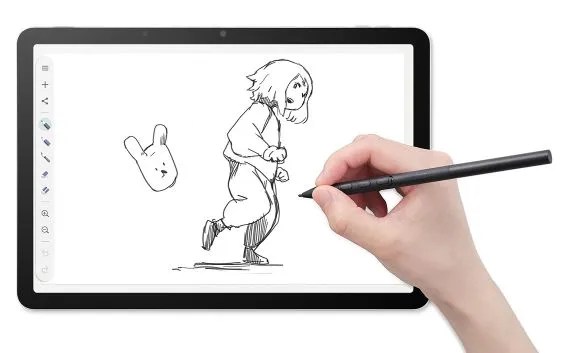
A recent review of the Wacom MovinkPad 11 got me thinking about this. Wacom, a company founded in 1983, is one of the oldest graphics tablet makers in the world. The MovinkPad 11 is their entry-level Android tablet for digital artists. It doesn’t try to be a laptop. It doesn’t claim to replace your phone. It does one thing — let you draw with a stylus — and it does that very well. That mindset is something every Malaysian SME owner can borrow.
TL;DR: The MovinkPad 11 is a purpose-built Android tablet for digital creatives — lightweight, with a good stylus and simple setup. But the bigger takeaway for Malaysian SMEs is this: before buying any new device, ask whether it matches the actual job your team needs to do, rather than just looking capable in a spec sheet.
What This Means
Let’s break down what the MovinkPad 11 actually is. It’s an 11.45-inch Android tablet with 8GB of memory and 128GB of storage, and it weighs just 1.3 pounds. It comes with the Pro Pen 3 stylus — a lightweight 6.3-inch pen with three programmable side buttons. The review notes that the stylus feels like a fine-tipped felt pen, and users can swap nibs to change the drawing feel.
It runs on Android, which means it can sync to Google accounts — convenient for teams already using Google Workspace. It ships with Wacom Canvas, a free drawing app, and supports Clip Studio Paint for users who want more advanced features. Everything about the device points toward one activity: digital sketching. Purpose-built, through and through.
| Device | Screen | Build Focus | Ecosystem |
|---|---|---|---|
| MovinkPad 11 | 11.45 inches | Entry-level digital drawing | Android + Google sync |
| MovinkPad Pro 14 | 14-inch OLED, 3K | Professional colour-accurate work | Android + Google sync |
| General-purpose tablets | Varies | Everything from media to spreadsheets | Platform-dependent |
“The best tool isn’t the one with the most features — it’s the one that disappears into your workflow and lets your team focus on the work itself.”
How This Applies to Malaysian SMEs
Here’s where this gets practical. Many Malaysian SMEs are still running on general-purpose tools for everything. Your graphic designer might be tracing logos with a laptop touchpad. Your marketing coordinator might be photographing paper documents and emailing them to themselves. Your operations team might be juggling shared spreadsheets when a purpose-built form tool would do the job in half the time. These are all situations where the tool is fighting the workflow instead of supporting it.
Take the design example. If your business creates its own marketing materials — signage for a restaurant menu, packaging mockups for a food brand, or social media visuals for a boutique — a device like the MovinkPad 11 lets your designer sketch directly in digital form. Ideas go from brain to screen without the extra step of scanning paper. The review highlights how digital art lets creators sketch and conceptualise before transferring their work into other formats. For an SME that’s rebranding or producing weekly content, that speed matters.
But the deeper point is about procurement mindset. When you evaluate a device for your team, ask: What job is this person doing every day? If your sales team needs to show a product catalogue, a simple Android tablet with the right app makes sense. If your admin team processes forms on the go, a device with a good camera and scanning software beats a keyboard-first laptop. If your team member does creative work, a stylus-first device beats a laptop and mouse. The MovinkPad 11 is a reminder that “the best device” depends on the role — not the brand.
There’s also the ecosystem angle. The MovinkPad 11 runs on Android and syncs to Google accounts, which connects directly to how many Malaysian SMEs already operate — using Gmail, Google Drive, and Google Calendar. When your hardware and software sit in the same ecosystem, onboarding is faster and there’s less IT headache. That’s a quiet but powerful form of automation: the device already knows where your files live and who they belong to.
Practical Takeaways
Next time your business needs a new device, run through this checklist:
- Audit the workflow first. Spend a week watching how your team spends their time. List every paper form, repeated task, or slow step before you choose anything.
- Match the tool to the role. A designer might need a stylus; a coordinator might need a scanning app. Don’t buy one device for everyone.
- Check the ecosystem. Does the device sync with Google or Microsoft tools you already use? Syncing saves hours of manual transfer work.
- Look at the bundled software. The MovinkPad ships with Wacom Canvas, ready to use out of the box. Ask what your device includes and whether it covers the job.
- Test before you commit. The reviewer — a self-described non-artist — found the device fun and easy to use. If a non-expert can pick it up quickly, your team probably can too.
The Bigger Picture
Long-term, the trend is clear: hardware is becoming more specialised, while software handles the integration. A device like the MovinkPad 11 is not trying to be your company’s central computer. It’s a tool in a larger system — sketch on the tablet, sync to the cloud, edit on the laptop, publish to your customers. When each tool does its part, your business process becomes smoother without you having to automate anything complicated.
For Malaysian SMEs, this points to a practical strategy: instead of buying fewer, bigger machines that claim to do everything, consider a portfolio of purpose-built tools that connect through the cloud. A dedicated device for design. A reliable phone for field work. A solid laptop for administration. Each is simpler to operate, easier to train on, and less stressful to replace when something breaks.
The MovinkPad 11 might not be the product your business needs. But the thinking behind it — build the right tool for a real job, and keep it simple — is exactly the mindset that separates SMEs that move forward from those that stay stuck in old habits. The next time you’re about to choose “one device to rule them all,” stop and ask: what’s the one job this tool should do best?
Ready to Streamline Your Operations?
Your business should run itself. AutoRunBiz deploys AI agents to automate your daily operations — WhatsApp orders, invoicing, customer follow-ups, and accounting. Book a free 15-min ops audit to see where automation fits your business →