
When Your Business Information Is Trapped in Typing
If you run a Malaysian SME, your day is probably split between replying to customers, checking supplier emails, preparing quotations, updating staff, and remembering tasks that never made it into a proper system. The work is not always difficult, but it is scattered across inboxes, documents, chat messages, and notes.
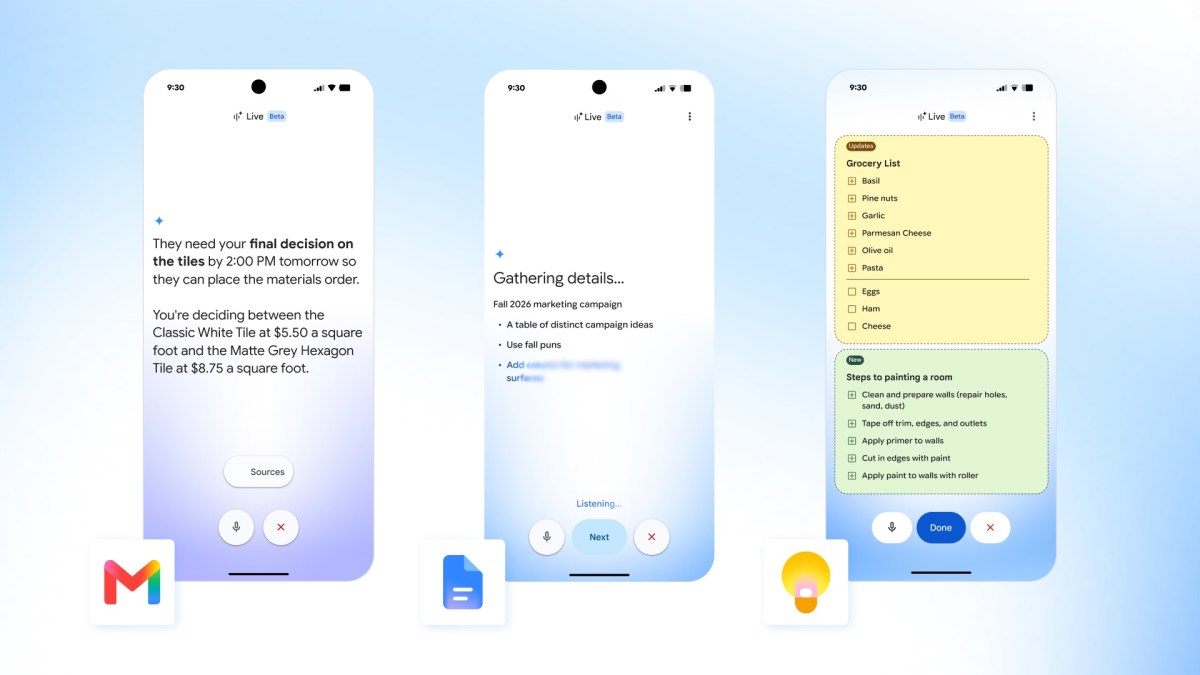
That is why voice-based AI inside everyday business apps deserves your attention. Google has introduced conversational features called Gmail Live, Docs Live, and Keep Live, allowing users to ask questions, dictate notes, and create first drafts using natural language. The features are designed for mobile use on iOS and Android, with Workplace Business availability planned soon, according to TechCrunch.
You do not need to become an AI specialist to benefit. The useful question is simpler: which repetitive tasks could you complete by speaking instead of searching, typing, and switching between apps?
TL;DR
Google’s new voice features let you ask questions about Gmail, create document drafts, and capture structured notes through spoken instructions.
For Malaysian SMEs, the practical value is faster information retrieval, better follow-up, and less administrative work—provided you set clear approval and privacy rules.
What This Means
Traditionally, using Gmail or Google Docs requires you to know where information is stored. You search for an email, open a document, copy details, and then write a response or summary. Voice AI changes the interaction: you describe what you need in ordinary language, and the assistant helps find or prepare it.
In Gmail, users can ask questions about their inbox instead of relying only on keyword searches. A live transcript appears while they speak with the assistant. For example, you might ask, “Which customers are waiting for a quotation?” or “Summarise the supplier messages about delayed delivery.” The quality of the answer will depend on the information available in your account, but the interaction is closer to having a research assistant than using a traditional search box.
In Docs, you can describe the document you want and receive a first draft. The feature can draw information from Gmail, Drive, chat, and the web, as reported by TechCrunch. That could help you prepare meeting notes, internal announcements, standard operating procedures, or customer updates.
Keep Live focuses on spoken capture and organisation. Instead of typing a quick thought, you can dictate it and ask the tool to turn it into a list, recipe, checklist, or other structured note. The source article gives a recipe and ingredient-list example, but the same approach could apply to stock checks, renovation measurements, event preparation, or staff instructions.
| Feature | Business task it may support | Important consideration |
|---|---|---|
| Gmail Live | Find unanswered messages and summarise conversations | Review the answer before acting |
| Docs Live | Create first drafts from spoken instructions | Check facts, tone, and confidential details |
| Keep Live | Capture tasks, ideas, and checklists without typing | Convert notes into assigned actions |
The feature availability described by Google is not identical across all plans: Gmail Live is listed for Google AI Plus, Pro, and Ultra customers, while Docs Live and Keep Live are listed for Pro and Ultra users. Google said the features would become available to Workplace Business customers soon, and the initial rollout is in English on iOS and Android, according to TechCrunch. You should confirm availability in your own organisation before planning around it.
How This Applies to Malaysian SMEs
1. Faster customer follow-up. Imagine you operate a small construction, renovation, printing, training, or professional services company. A customer may send several emails over a few days, asking about availability, delivery timing, revisions, and payment documents. Instead of opening every message, you could ask Gmail to identify the latest request, summarise the conversation, and highlight what still needs a reply. You would still approve the final response, but the preparation becomes less tedious.
2. Better handovers between staff. In a company with a small team, one person’s absence can create confusion. A sales executive may know the customer history, while the operations staff know the delivery status. Voice-assisted summaries could help create a handover note from recent emails and documents. For example, you could dictate: “Prepare a handover for the Bukit Jalil project, including open customer questions, promised dates, and the next person responsible.” The result should be checked, but it gives your team a starting structure.
3. Practical documentation without a dedicated writer. Many SMEs know they need clearer procedures but never document them because everyone is busy. You can speak through a process such as onboarding a new retail assistant, checking incoming stock, approving a quotation, or handling a customer complaint. Docs Live may help turn your explanation into a first draft, which your team can then refine. This is especially useful when important knowledge currently exists only in your head or in informal WhatsApp instructions.
4. Capturing ideas while moving around. Malaysian business owners are often away from their desks—visiting a site, checking a shop floor, meeting a supplier, or travelling between branches. Keep Live can make it easier to capture ideas, observations, and action items while they are fresh. Instead of recording a vague note such as “follow up with supplier,” dictate the supplier name, product, issue, deadline, and next step. A structured note is much easier to act on later.
5. Supporting multilingual working environments carefully. Malaysian teams may use English, Bahasa Malaysia, Mandarin, Tamil, or a mixture of languages. The source article specifies an English rollout, so you should test recognition quality with your actual staff and work situations before relying on it. Names, product codes, Malaysian addresses, and industry terms can be misheard. Voice AI should assist your workflow, not replace a final human check.
The best use of voice AI is not asking it to run your business. It is removing the small delays that stop you from making decisions and following through.
Practical Takeaways
- Start with one workflow: choose email follow-up, meeting notes, or procedure drafting rather than trying every feature at once.
- Use a standard prompt: ask for the customer, issue, deadline, missing information, and recommended next action.
- Keep human approval: never send an AI-prepared customer reply or publish a document without checking it.
- Separate sensitive information: review your company’s rules before using voice tools with identity documents, banking information, contracts, or private employee matters.
- Test terminology: check how the tool handles local names, addresses, model numbers, Bahasa Malaysia phrases, and internal abbreviations.
- Turn notes into ownership: every useful note should end with an assigned person and a due date.
- Create a review habit: compare the AI summary against the original email or document when the matter affects customers, compliance, or operations.
- Measure time saved: track how long a task takes before and after adoption. A simple weekly comparison is enough.
A Simple 30-Day Starting Plan
- Week one: identify three repetitive information tasks, such as finding unanswered emails, writing meeting summaries, and creating checklists.
- Week two: test voice input with non-sensitive examples and record common recognition errors.
- Week three: create short internal instructions explaining when staff may use the feature and when human approval is required.
- Week four: review the results with your team. Keep only workflows that genuinely reduce delays or improve follow-up.
The Bigger Picture
Voice AI inside business software points to a gradual change in how SME owners interact with information. You may not always need to open a separate tool, learn a complicated command, or remember exactly where a file was saved. Instead, you can describe the business question and receive help gathering the relevant material.
That does not remove the need for organised records. In fact, it makes clean information more important. If customer names are inconsistent, documents are outdated, or staff store key updates in personal accounts, the assistant will have less reliable material to work with. Better naming, clear folders, and consistent email subjects remain valuable.
Google has already been adding voice-related capabilities across its apps, including cross-app dictation and speech-to-text developments, according to TechCrunch. For your business, the long-term opportunity is not simply speaking to an app. It is building a work environment where information can be captured quickly, organised properly, and turned into the next action.
Start with one frustrating task that happens every week. If speaking a clear instruction helps you find the answer, prepare the draft, or record the action faster, you have found a practical use case. Keep the approval step, protect sensitive information, and expand only when the benefit is visible to your team.
Ready to Streamline Your Operations?
Your business should run itself. AutoRunBiz deploys AI agents to automate your daily operations — WhatsApp orders, invoicing, customer follow-ups, and accounting. Book a free 15-min ops audit to see where automation fits your business →