
Google’s New Video AI Is Relevant to Your SME
If your business uses product demonstrations, training recordings, customer testimonials, livestreams or security footage, reviewing video can become a slow administrative task. A 90-minute recording may contain only a few moments that matter, yet a conventional AI system may process the entire timeline instead of looking for the relevant section.
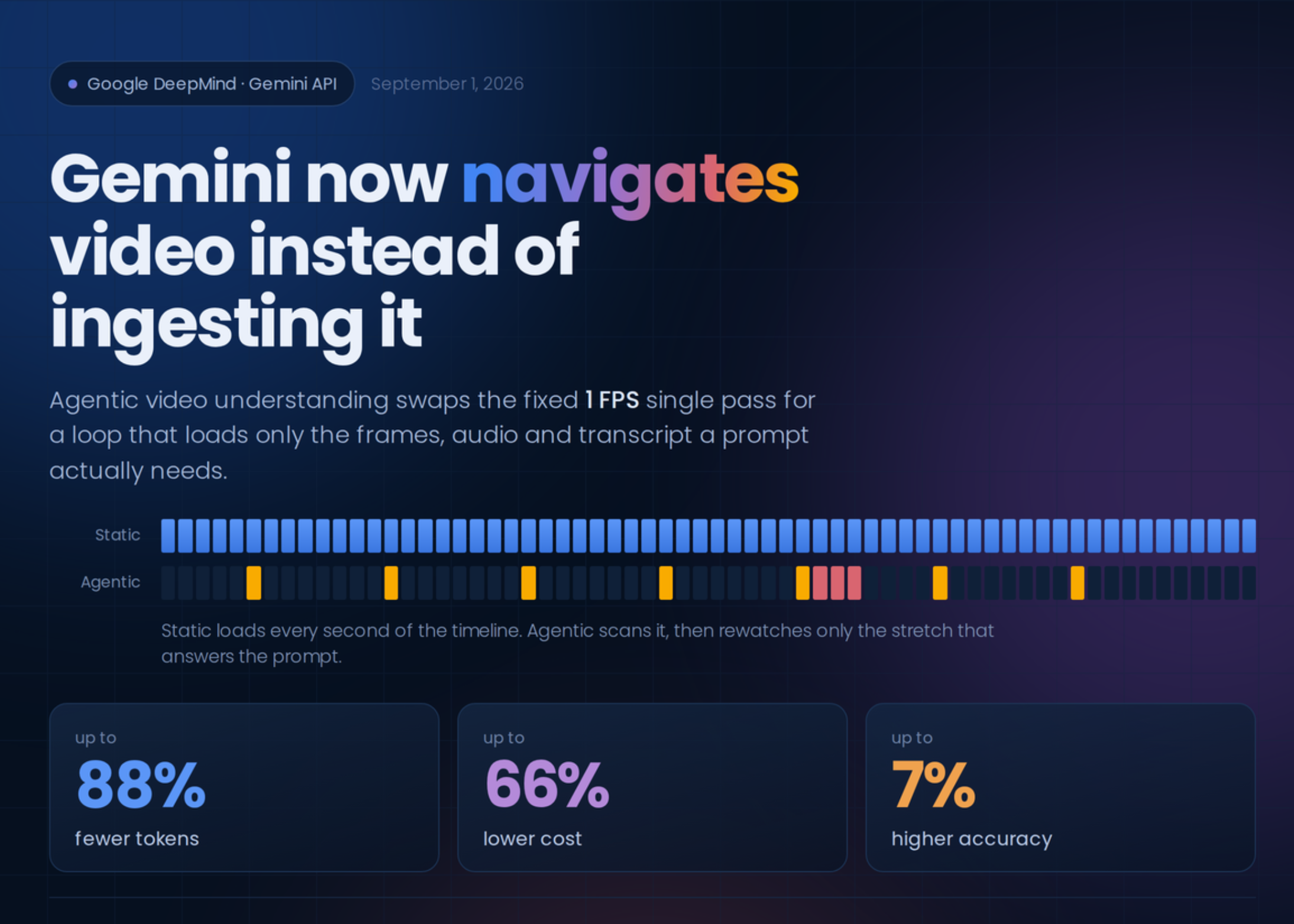
Google has now introduced agentic video understanding for its Gemini Flash models. According to MarkTechPost, the feature allows Gemini to navigate video, choose which segments to inspect and use frames, audio or transcripts according to the question. Google reports up to 88% fewer tokens, up to 66% lower cost and up to 7% higher accuracy on its video benchmarks. These figures are Google’s reported evaluation results, not a guarantee for every business workflow.
For a Malaysian SME, the practical lesson is simple: video AI is moving from “watch everything” to “find what matters”. That could help you turn existing recordings into searchable business knowledge without asking a staff member to sit through every minute.
What Happened
Previously, static video processing generally examined video at a fixed rate. The source article describes the default approach as extracting frames at one frame per second, processing audio and adding timestamps through a single pass. This can work for short clips, but it is inefficient when you need a precise answer from a long lecture, meeting or product recording.
Google’s agentic approach replaces that fixed process with an internal loop. Gemini can first reason about the request, then search, scan and inspect selected parts of the timeline. It may examine a transcript for one question, focus on visual frames for another or combine both when the answer depends on what was said and shown.
The feature is available as a hosted API through Google AI Studio and the Gemini API, as well as the Gemini Enterprise Agent Platform, according to the source article. It supports uploaded files and public YouTube URLs. The article also states that agentic processing is enabled through a processing field in the video request, while standard video processing remains available.
The API can return processing steps that show when the model requests a segment or transcript and when the result is received. These steps can be useful if you are building a dashboard that shows progress while a long video is being analysed. Developers can also mix processing methods, such as using agentic processing for a long training session and static processing for a short clip.
Why This Matters for Malaysian SMEs
Many Malaysian SMEs already create or receive more video than they realise. A Klang Valley retailer may record product livestreams. A Penang manufacturer may receive installation videos from technicians. A Johor logistics company may store driver briefings or warehouse training recordings. A restaurant group may film outlet training sessions. The problem is not always creating content; it is finding useful information later.
With video understanding, you could ask questions such as “When does the trainer explain the cleaning procedure?”, “Which product features are demonstrated?”, or “What customer objections appear during the livestream?” Instead of manually searching, you could use AI to identify timestamps and produce a review list for a manager.
For customer service teams, recorded calls or video consultations could be reviewed for recurring questions. A property agency could locate the section of a virtual viewing where parking, maintenance or renovation details are discussed. A tuition centre could search recorded lessons for explanations of a particular topic. A small engineering firm could identify the exact part of a site briefing where a safety procedure was demonstrated.
However, you should treat the AI output as an assistant’s first review, not as a final business record. Important claims, safety instructions, compliance matters and customer commitments should be checked by a responsible employee. Malaysian businesses should also consider consent, access controls and the handling of personal data before uploading recordings.
Use video AI to reduce the time spent locating information, not to remove human responsibility for deciding what the information means.
Useful SME applications
| Business activity | Possible video AI task | Human check needed |
|---|---|---|
| Staff training | Find procedures, examples and unanswered questions | Confirm the latest process and safety details |
| Product livestreams | Extract product demonstrations and customer objections | Verify claims before reuse in marketing |
| Sales meetings | Locate requirements, objections and follow-up items | Confirm commitments with the customer |
| Technical recordings | Find troubleshooting steps and equipment references | Check against approved documentation |
| Online classes | Search explanations by topic or timestamp | Review educational accuracy and context |
How to Start Without Disrupting Your Operations
Begin with one repetitive task. Choose a long recording that staff frequently review, such as a monthly training session or a product demonstration. Write five questions your team regularly asks about that video. Test whether the system can return useful timestamps and summaries.
Next, create a simple review process. Store the original file, the AI-generated answer, the relevant timestamp and the name of the employee who verified it. This makes the workflow easier to audit and helps your team learn where the system performs well or poorly.
Keep short clips and precision work separate. The source article states that static processing remains better for clips under five minutes and frame-by-frame precision tasks. Agentic processing is more useful when the content is long and the answer is located somewhere within a broad timeline.
Also, avoid uploading sensitive footage casually. Review whether the recording includes customer identities, payment information, private conversations, employee records or confidential business information. Limit access to authorised staff and define how long files and generated notes should be retained.
The Bigger Picture
This launch points to a broader change in business automation. AI systems are increasingly able to decide which information they need before producing an answer. For video, that means the system does not have to treat every second as equally important.
That shift could make video a more practical source of business data for smaller companies. Your existing recordings may contain product knowledge, service feedback and operational instructions, but they are difficult to use when they are locked inside large files. Better navigation can help turn those files into searchable resources.
Still, efficiency should not be confused with reliability. Google’s reported results describe benchmark performance, while your results will depend on audio quality, accents, lighting, terminology, video length and the clarity of your questions. Test the system using real Malaysian business content, including mixed English and Bahasa Malaysia where relevant, before relying on it for important decisions.
The best starting point is a focused workflow: select one long video, define the questions, verify the answers and measure whether your staff spend less time searching. If the result is useful, connect the process to your existing document storage, customer relationship system or internal knowledge base. That is how a new AI feature becomes a practical operating improvement rather than another experiment.
Ready to Streamline Your Operations?
Technology moves fast. Your operations should keep up. AutoRunBiz builds AI systems that run your daily workflows — from WhatsApp order capture to accounting. Book a free 15-min ops audit →