
Why Amazon’s AI Scam Checker Matters to Your Business
A scam message rarely looks dangerous at first. It may mention an order, an account warning, a delivery problem, or an urgent payment request. For a Malaysian SME owner, one wrong click can expose customer information, staff accounts, business email, or access to online marketplaces.
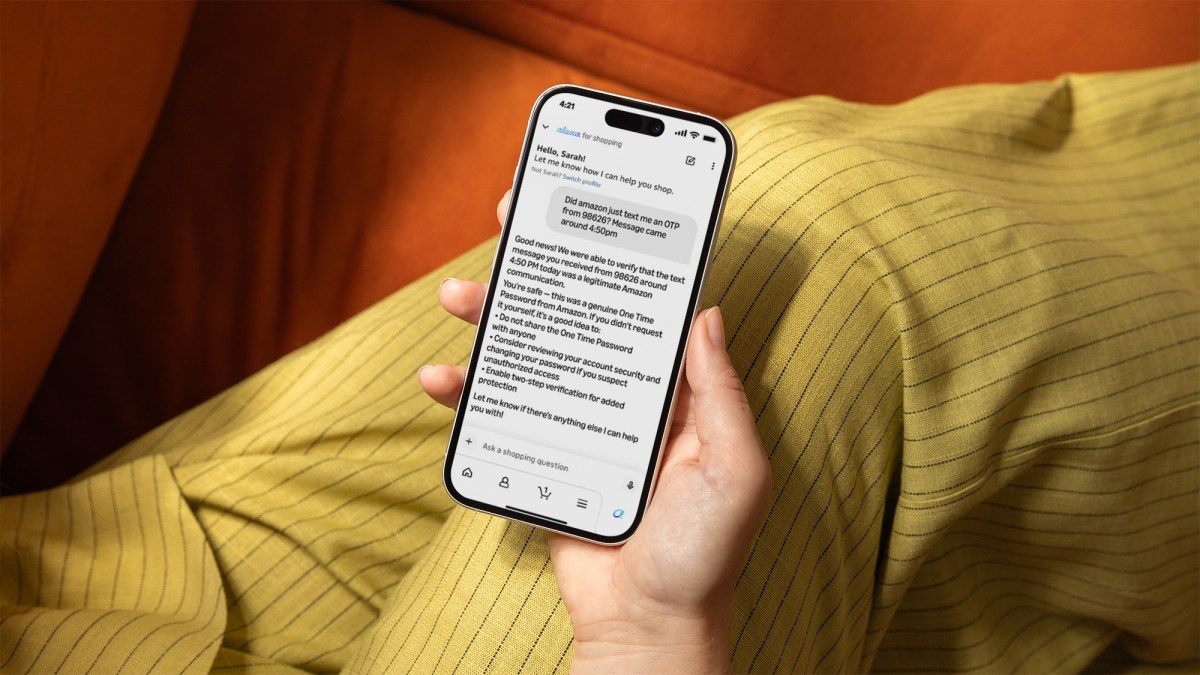
Amazon’s latest move shows how large companies are using artificial intelligence to help people verify suspicious communications. According to TechCrunch, Amazon’s shopping AI can now check whether a message genuinely came from Amazon by comparing it with the retailer’s large collection of official communications.
The important lesson is not that you should wait for every platform to provide an AI checker. It is that scam verification is becoming a normal business process. Your team needs a reliable way to pause, inspect, and confirm messages before anyone acts on them.
What Happened
Amazon said around 360,000 customers contact its customer service department each year to ask whether a message claiming to be from Amazon is genuine. The company has now added scam-checking capabilities to Alexa for Shopping, its consumer AI service available through Amazon’s website and mobile app, as reported by TechCrunch.
The system examines details such as sender information, message content, timing, metadata, and other signals. Amazon says it can compare a suspicious communication against billions of messages sent globally to determine whether it originated from Amazon’s systems. It also expects the system to improve as customers report more suspicious messages, according to the same TechCrunch report.
The feature is designed to address common scam themes, including fake order confirmations, Prime membership renewal warnings, account suspension alerts, package delivery notices, and job offers. Amazon also provides an email verification channel and an online customer service form for people who want to submit suspicious messages, as noted by TechCrunch.
This is part of a broader shift in Amazon’s Alexa strategy. The assistant now supports shopping-related tasks such as personalised deals, shopping guides, product overviews, reordering everyday items, and handwritten shopping-list transcription. Amazon has also introduced alerts for events such as a favourite brand releasing a product, based on information reported by TechCrunch.
“The practical lesson for your company is simple: treat every unexpected message as unverified until it passes an independent check.”
Why This Matters for Malaysian SMEs
Malaysian SMEs often depend on email, WhatsApp, SMS, social media, online banking, e-commerce platforms, courier services, and cloud software. These tools keep a small team productive, but they also create many opportunities for impersonation. A fake message may appear to come from a marketplace, delivery company, bank, software provider, customer, or business partner.
Consider a local online seller receiving a message that claims a customer’s payment is blocked. The message includes a link and asks the staff member to log in immediately. Another example is a fake courier notice asking for an address update. A café, wholesaler, or service business may receive a message pretending to be from a supplier requesting a change to bank details. In each case, the language can look convincing, especially when the team is busy.
AI tools can help identify suspicious patterns, but you still need a company-level process. Do not make one employee responsible for judging every message based on instinct. Create a clear rule: urgent requests involving passwords, payment details, account access, refunds, or new bank information must be verified through a separate official channel.
For example, if a supplier sends a request to change account details by email, call the supplier using a telephone number already stored in your records. Do not use the number included in the new message. If a marketplace message asks you to log in, open the official app or type the known website address yourself rather than clicking the link.
Practical Scam-Checking Rules for Your Team
| Situation | What You Should Do |
|---|---|
| Unexpected account warning | Open the official app or website independently and check notifications there. |
| Request for payment or bank-detail changes | Confirm through a known phone number and require a second staff member to review it. |
| Suspicious attachment or link | Do not open it; ask your IT provider or security contact to inspect the message. |
| Message claiming to be from a customer | Check the sender address, conversation history, and unusual urgency before responding. |
| Possible impersonation of a platform | Use the platform’s official help centre or in-app support channel for verification. |
How to Apply This in Your Business
Start by listing the services your business uses every week. Include your email provider, online marketplace, delivery platforms, accounting software, cloud storage, payment services, advertising accounts, and messaging tools. For each service, record the official website, support page, and verified contact route.
Next, create a short internal policy that your employees can understand. State that no one may disclose passwords, one-time passwords, recovery codes, customer data, or payment information based only on an incoming message. A message can look professional and still be fraudulent.
Use multi-factor authentication wherever it is available. This does not replace careful checking, but it adds another barrier if a password is exposed. Assign access according to job needs as well. A staff member handling product listings may not need permission to change payment settings or export the full customer database.
You can also use AI carefully as a review assistant. Ask an approved tool to identify unusual wording, suspicious requests, mismatched domains, or pressure tactics. However, do not paste sensitive customer information, passwords, identity documents, or confidential business records into an AI service unless you have confirmed that the tool is suitable for that data.
The Bigger Picture
Amazon’s announcement points to a wider change in online commerce. Platforms are no longer only helping customers search for products or solve service questions. They are also trying to interpret risk and guide users through uncertain situations. That makes AI a potential layer in your business security process.
Still, an AI result should not become your only approval mechanism. Scam messages can be incomplete, manipulated, or designed to exploit gaps in automated systems. Your strongest protection comes from combining technology with simple human controls: independent verification, restricted access, staff awareness, and documented procedures.
For Malaysian SME owners, the most useful response is to build a “stop and check” culture. Teach employees that urgency is a warning sign, not an instruction. Ask them to report suspicious messages without embarrassment. Keep records of attempted scams so future messages can be recognised more quickly.
Amazon’s AI scam-checking feature is a useful reminder that verification is becoming part of the digital customer experience. Your business can adopt the same principle today, even without a sophisticated security department: question unexpected requests, use official channels, involve a second person, and never let a message alone authorise a sensitive action.
Source: TechCrunch, “PSA: Amazon’s shopping AI can now tell you if that message is a scam”.
Ready to Streamline Your Operations?
Technology moves fast. Your operations should keep up. AutoRunBiz builds AI systems that run your daily workflows — from WhatsApp order capture to accounting. Book a free 15-min ops audit →