
Small Android Updates Can Solve Everyday Business Friction
Running a small business often means managing work through ordinary moments: replying to a customer while travelling, checking a product label in poor lighting, remembering where important documents were placed, or updating a shared list in a busy WhatsApp-style conversation. These tasks may look minor, but repeated interruptions can slow your team down.
Google’s latest Android updates focus on accessibility, motion comfort, visual assistance, memory support and better message personalisation. The announcement includes five features: Motion Assist, Guided Vision, remembered items in Find Hub, Google Keep integration with Google Messages, and more customisation for individual chats. Source: TechCrunch
If you operate a Malaysian SME with a small team, the important question is not whether these features look impressive. It is whether they can reduce avoidable mistakes, help staff work more independently and make mobile-based processes easier to manage.
TL;DR
Android is adding practical features that support staff who work while travelling, have visual difficulties or frequently handle shared information.
For your SME, the biggest opportunity is to review how your team uses Android phones for checklists, customer communication, document handling and field work before deciding which features are useful.
What This Means
These updates show Android moving beyond basic phone functions. The phone becomes more aware of context: whether the user is in a moving vehicle, looking at a small object, trying to remember where something was placed or discussing a shared list inside a conversation.
1. Motion Assist
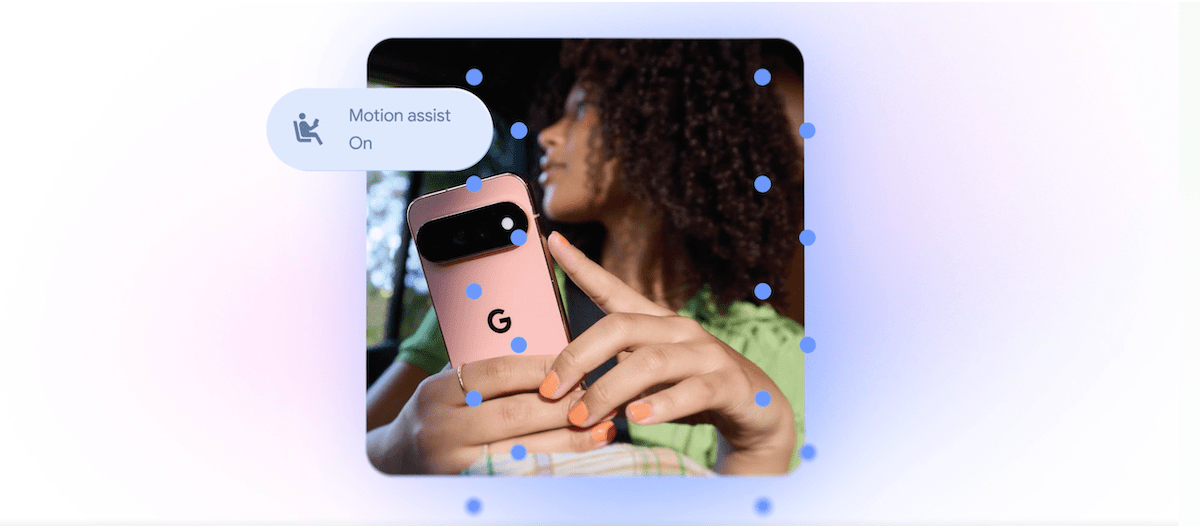
Motion Assist adds a bubble overlay that moves in response to vehicle movement. The intention is to reduce the mismatch between what your eyes see on the screen and what your body feels while travelling. Users can set it to activate automatically, add it to Quick Settings, and adjust the bubble’s shape, colour and transparency. Google says it is available for Android 17 users. Source: TechCrunch
This could be relevant to sales representatives, delivery coordinators, property agents and service technicians who need to check information while riding in a car or van. It is not a replacement for safe driving: the person operating a vehicle should not use a phone while driving.
2. Guided Vision
Guided Vision combines the phone camera with Gemini to help blind and low-vision users read small print, view menus in dim places and identify objects. It can also provide voice instructions, such as asking the user to move the phone, pan around or centre an object. Google says the feature is coming to Android 9 and newer in countries where Gemini is available. Source: TechCrunch
For a business, this points to a wider principle: mobile tools should help more people complete tasks without depending on a colleague. That matters when staff are working across different locations, shifts and abilities.
3. Remembered items in Find Hub
Users can tell Gemini where they put an important item, such as a passport in a bedroom drawer. They can also attach a photo to make the item easier to identify later. The information is saved in a remembered items section in Find Hub. Source: TechCrunch
This is designed for personal use, but the idea has business value. Your team may need to track where a sample, key, signed form, spare device or product display item was kept. However, you should set clear rules before recording sensitive information in any personal assistant or consumer application.
4. Google Keep inside Google Messages
Google is adding a Google Keep integration to Google Messages, allowing users to share and edit grocery lists, travel notes and other information within a conversation. Source: TechCrunch
For SME teams, this resembles a simple shared task list. It can help with site preparation, event supplies, customer requests and follow-up items. Still, it should not replace a proper system for confidential records, formal approvals or important operational reporting.
How This Applies to Malaysian SMEs
Retail and food businesses can use the ideas behind these updates to improve daily preparation. A café team could maintain a shared opening checklist covering ingredients, packaging, cleaning tasks and equipment checks. A small retailer could use visual assistance to read labels, compare product information or identify stock in a storage area. If several employees contribute to the same list, you should appoint one person to confirm completed items rather than assuming every update is accurate.
Service businesses and contractors may benefit from better mobile access while staff are travelling between customer locations. Air-conditioning technicians, renovation teams, pest-control operators and maintenance companies often carry instructions, photos and checklists on their phones. Motion Assist may make short periods of screen use more comfortable for some passengers, while camera-based assistance may help staff inspect labels or equipment. Create a standard process: check the job details before arrival, capture evidence after the work, and update the customer record when the task is complete.
Professional services firms can apply the remembered-items concept to reduce internal searching. A small accounting, recruitment or consulting firm may have shared folders, physical files, signed documents and loaned equipment moving between offices or client sites. Rather than relying on memory, record the item in an agreed workspace with a clear description, owner and date. Avoid placing identity documents or confidential client details into informal notes unless your data-handling policy allows it.
Tourism, property and field sales teams may also find accessibility features useful. Staff could work in unfamiliar buildings, restaurants, showrooms and outdoor locations. Camera-based tools may assist with reading signs or identifying objects, but AI output should be checked before it is used in a customer-facing decision. A wrong reading of a unit number, product specification or contract detail can create a larger problem than the original inconvenience.
Businesses with mixed-age or diverse teams should treat accessibility as a practical operating concern, not a specialist topic. A staff member with low vision, motion sensitivity or difficulty handling small text may perform better when the phone provides voice guidance, visual adjustments or a less distracting interface. Ask employees what slows them down, then test solutions with their consent.
A Simple Feature Review for Your Business
| Business need | Relevant Android idea | Recommended control |
|---|---|---|
| Staff read information while travelling as passengers | Motion Assist | Use only when stationary or travelling as a passenger; never while driving |
| Reading labels or identifying objects | Guided Vision | Verify important readings against the original item |
| Finding equipment or documents | Remembered items in Find Hub | Record location, owner and sensitivity level |
| Sharing simple team lists | Google Keep integration with Messages | Assign one person to confirm the final checklist |
| Making chats easier to distinguish | Custom backgrounds, photos and colours | Do not rely on colour alone for urgent or important messages |
Practical Takeaways
- Ask your team which mobile tasks cause the most delays or repeated questions.
- Test new features with one small workflow before introducing them across the business.
- Separate casual lists from sensitive customer, employee and financial information.
- Require human verification when AI reads text, identifies objects or gives directions.
- Use shared checklists with clear ownership, deadlines and completion rules.
- Remind every employee that phone assistance does not make driving while using a phone safe.
- Review Android versions and Gemini availability before planning a rollout. Google says Guided Vision supports Android 9 and newer in countries where Gemini is available, while Motion Assist is described as an Android 17 feature. Source: TechCrunch
The useful question is not “What can AI do?” It is “Which repeated task can your team complete more clearly, safely and consistently?”
The Bigger Picture
Mobile phones are becoming practical work companions rather than simple communication devices. Features that respond to movement, interpret visual information, remember locations and organise shared notes point towards more context-aware work.
For Malaysian SMEs, this does not mean you need to introduce complicated technology immediately. Your advantage comes from choosing small improvements that fit the way your team already works. Start with one recurring problem: lost items, incomplete site checklists, unreadable labels, scattered instructions or staff who need better accessibility support.
Then set boundaries. Decide what information may be stored, who can access it, how long it should be kept and when a human must verify an AI result. Consumer features can be helpful, but they should sit inside sensible business procedures.
The most practical path is gradual adoption. Review your current Android devices, test relevant features with real staff and measure whether the process becomes clearer. If it does, document the workflow. If it does not, remove it. Good automation is not about adding more tools; it is about reducing unnecessary effort while keeping your team responsible for important decisions.
Ready to Streamline Your Operations?
Your business should run itself. AutoRunBiz deploys AI agents to automate your daily operations — WhatsApp orders, invoicing, customer follow-ups, and accounting. Book a free 15-min ops audit to see where automation fits your business →