
Your Phone Was the Weakest Link in Your Workflow
If you run a business in Malaysia, WhatsApp is your virtual office. It’s where customers find you, where quotes go out, and where urgent support tickets land. But if you work primarily from a laptop or desktop, there has always been a frustrating weak link: phone calls. Every time your phone buzzed with a WhatsApp call, you had to stop what you were doing, grab the smallest screen in your setup, and try to multitask while balancing a conversation with the work right in front of you.
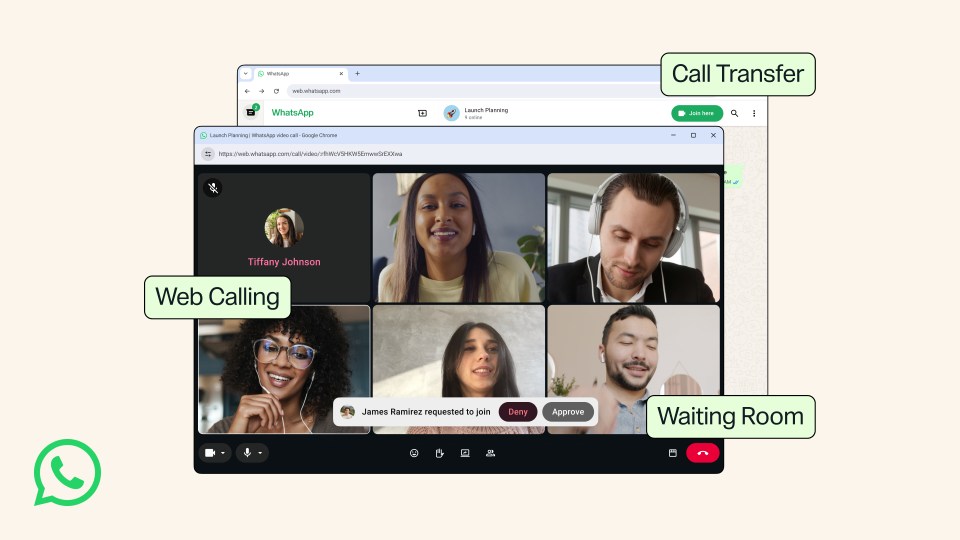
That awkward dance is finally over. Meta has quietly enabled a feature that many Malaysian SMEs have been waiting for: native voice and video calls directly inside WhatsApp Web. You no longer need your phone to be active or nearby for the call to connect. According to a detailed report from SoyaCincau, this feature is rolling out globally and works on Chrome, Edge, and Firefox.
This isn’t a beta waiting for your feedback. It is a live update that shifts how you manage communication. For the thousands of business owners balancing orders, clients, and teams from a computer screen, this changes your entire daily rhythm.
What Just Happened?
TL;DR: WhatsApp Web now handles voice and video calls natively in your browser. You do not need your phone to be unlocked or connected to data for the call to work. This means better call quality, seamless screen sharing, and the ability to multitask without juggling devices.
What This Actually Means for Your Daily Operations
Technically, Meta updated the WhatsApp Web client to use WebRTC (Web Real-Time Communication). This is the same peer-to-peer standard used by Google Meet and Microsoft Teams. Previously, WhatsApp Web was entirely dependent on your phone to relay the media stream. Now, your browser handles the entire audio and video pipeline independently. Your phone is just the authenticator, not the conductor.
“This update removes the biggest friction point in business communication. It is not a new app, it is the same tool you already trust, working better where you actually get work done.”
How This Specifically Helps Malaysian SMEs
In Malaysia, WhatsApp isn’t just a messaging app. It is the backbone of SME commerce. Here is exactly how this feature changes five common business scenarios:
1. Customer Support Without Context Switching
Imagine you are handling a customer who wants to change their delivery address. In the old workflow, you would take the call on your phone, ask them to hold, scramble to find their order in your system, and strain to read tiny details on the screen. Now the call happens on your desktop. You can pull up their order history on one monitor, update their details in your system, and confirm the change without ever breaking eye contact with the data. The entire interaction is smoother, faster, and far more professional.
2. Video Consultations That Actually Work
Many service-based SMEs in Malaysia rely on video calls. Think interior designers showing mood boards, financial advisors explaining reports, or fitness coaches correcting a client’s form. Previously, doing this on WhatsApp meant holding your phone or awkwardly propping it up against a coffee cup. With native desktop calls, you can share your screen to walk a client through a proposal, switch to your webcam for a face-to-face interaction, and keep the entire conversation thread attached to the customer’s chat history. It removes the friction of having to switch to a separate app like Zoom just for a quick consultation.
3. Better Audio Quality for Busy Environments
Malaysian offices and coffee shops can get noisy. Phone speakerphones are notorious for picking up background noise and creating echo for the person on the other end. Taking a WhatsApp call on your desktop using a decent headset or your laptop’s built-in microphone array provides far superior audio quality. Your customer hears your voice clearly, and you hear them without straining. It makes a massive difference in the perceived professionalism of a business call, especially on a busy shop floor or in a co-working space.
4. Empowering Your Team to Stay in the Zone
If you have staff handling customer service, sales, or operations, this feature is a productivity multiplier. Instead of asking your team to keep their personal phones glued to their hands, they can take all business calls right from their workstations. A quick voice call to clarify a customer request no longer interrupts their typing flow. It keeps them inside the ecosystem of tools they use for everything else, reducing the mental cost of switching between devices.
5. A Cleaner Record of Communication
Phone calls were previously separate from your chat history. Now the context of a voice or video call lives directly in the same chat window. You can immediately follow up a call with a text summarising what was agreed upon, attach a file, or send a payment link. Everything is logged in one place, making it much easier to reference later if there is a dispute or a need for a follow-up. Your CRM or memory doesn’t have to bridge the gap between systems.
Old Workflow vs. New Workflow
| Scenario | Before WhatsApp Web Calls | After WhatsApp Web Calls |
|---|---|---|
| Receiving a customer enquiry | Stop typing. Grab phone. Juggling screens. | Push to talk. Continue typing. Context on screen. |
| Video consultation | Switch to phone. Lost context. No screen share. | Same window. Screen share. Full records kept. |
| Internal team huddle | Typed chat or separate Zoom meeting. | Instant voice call within existing group chat. |
| Handling a complaint | Phrase everything carefully in text to avoid tone issues. | Call directly from the chat. Warm tone solves it faster. |
| Following up on a quote | Send text. Wait. Send text. Wait. | Quick call. Immediate answer. Close the deal. |
Practical Steps to Get Started Right Now
Here is a simple checklist to make sure your business is ready to take advantage of this update immediately:
- Update your browser. Make sure you are running the latest version of Chrome, Edge, or Firefox. WhatsApp Web calls will not work on older versions.
- Check your network settings. Some corporate networks or VPNs block WebRTC traffic. Test the call feature with a team member first to ensure it connects properly.
- Test your audio setup. Plug in a headset or test your laptop microphone. Call quality is only as good as your weakest link, and a good mic makes you sound professional.
- Link your device. Open web.whatsapp.com and scan the QR code with your phone. Your phone links the browser, but it does not need to stay connected for the call to work.
- Teach your team. Show your staff how to start a call from the chat header. It is a single button press once the update is active on their account.
- Create a communication policy. Decide if video calls are preferred for certain customer interactions. Set brief expectations with your team about professionalism on camera.
The Bigger Picture: Your Browser Is Becoming Your Business Hub
This update signals a clear strategic shift from Meta. They are actively building WhatsApp to function as a primary business communication tool that does not rely on a mobile screen. For a Malaysian SME, this trend is critical. Your communication tools are finally moving to where your actual work happens: your desktop.
The next logical step is deeper integration. Imagine a CRM system that logs these voice calls automatically. Imagine being able to trigger an automation—like updating an order status or sending a follow-up email—simply because a call was made in a specific customer chat. This is where the real value lies, and this update lays the foundation for exactly that level of business automation.
For the business owner, the lesson is simple: reduce friction wherever you can. Anything that keeps you in your workflow, gives you full context, and sounds more professional is a direct investment in your operational efficiency. Test WhatsApp Web calls with your next customer enquiry. Watch how much smoother your afternoon feels when you don’t have to pick up your phone.
Ready to Streamline Your Operations?
Your business should run itself. AutoRunBiz deploys AI agents to automate your daily operations — WhatsApp orders, invoicing, customer follow-ups, and accounting. Book a free 15-min ops audit to see where automation fits your business →