
Why NVIDIA’s PAIR Matters to Your Business
Many Malaysian SMEs are experimenting with AI assistants for customer replies, document searches, sales analysis and internal workflows. The problem appears when one AI task becomes many smaller tasks. A single agent may ask several subagents to read documents, classify requests, draft answers and check the result. If every request runs on one computer, your team may face queues even when other capable devices on the same office network are doing nothing.
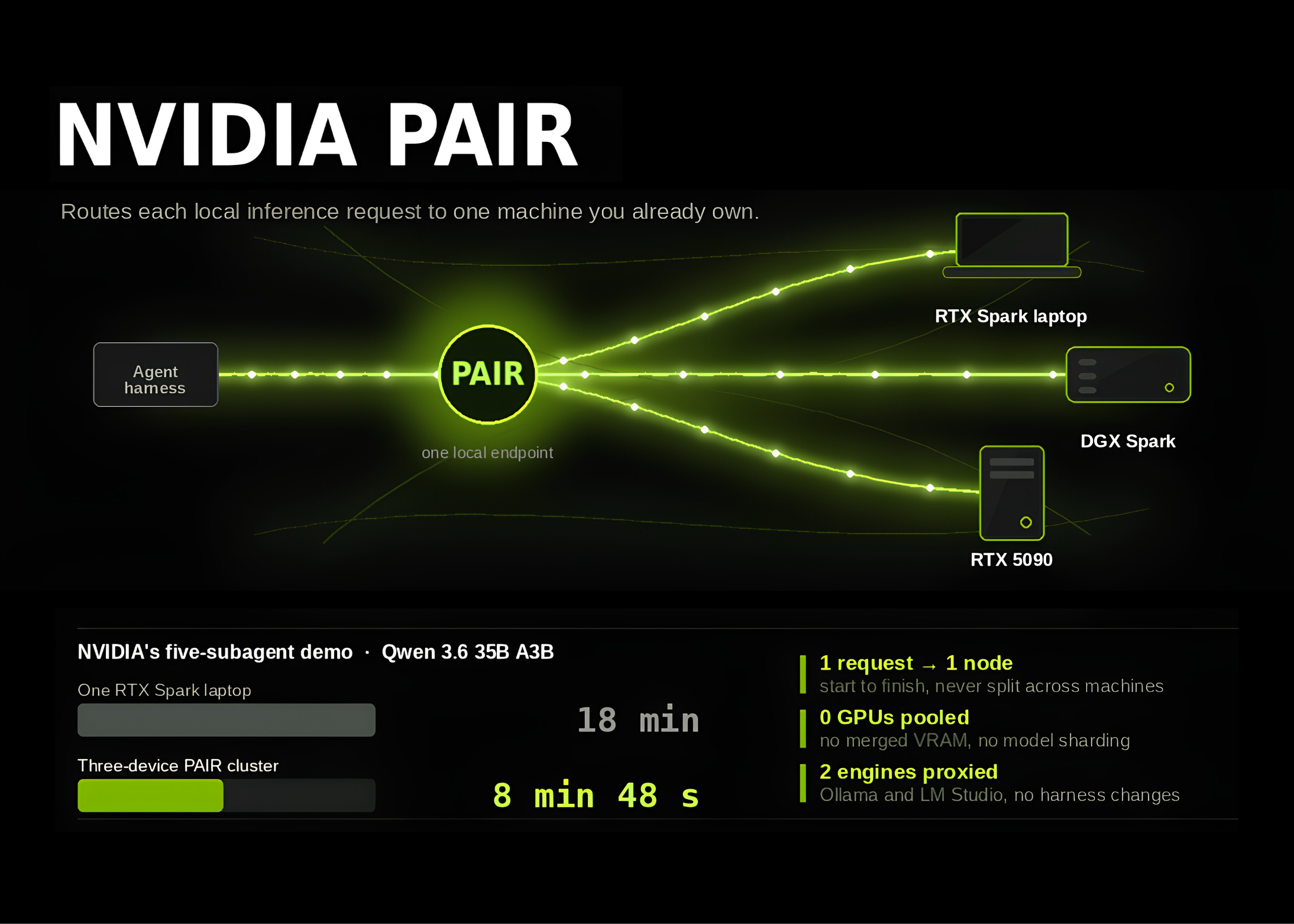
NVIDIA’s Personal AI Router, or PAIR, addresses this bottleneck by distributing independent local AI requests across compatible computers. It is not a new AI model or an application that combines several graphics cards into one larger processor. Instead, it acts as a virtual inference router that sends each request to an eligible machine running Ollama or LM Studio. Source: MarkTechPost
What Happened
NVIDIA released PAIR as a public beta, version 0.1.1, with signed installers for Windows, macOS and Linux. Its source code is available on GitHub under the Apache 2.0 licence. PAIR operates on your local network; an internet connection is needed to download models, but the routing activity itself remains within the network. Source: MarkTechPost
The important design choice is compatibility. PAIR proxies interfaces that Ollama and LM Studio already support, including OpenAI-compatible proxy endpoints. This means an existing agent harness can continue sending requests in the same way. The agent decides what task to request, while PAIR decides which paired computer should run it. You do not need to redesign every workflow simply because another device is added to the network. Source: MarkTechPost
PAIR discovers nearby systems through mDNS. If automatic discovery does not work, you can add a node by IP address. Pairing uses a six-digit PIN, and communication between paired nodes is protected with mutual TLS certificates. Each node still runs Ollama or LM Studio, and PAIR can help install an engine and begin model downloads on paired systems. Source: MarkTechPost
How the Router Chooses a Computer
PAIR does not send a request to any available device at random. A machine is eligible only when the required engine is enabled and the exact requested model is already available there. Different computers can hold different models, so your AI setup can contain several specialised options rather than one identical model everywhere. Source: MarkTechPost
The scheduler considers whether a node is online, whether its supported engine is enabled, whether the exact model is present, its current job load and its GPU utilisation. Each independent request stays on one selected node for its entire lifetime. PAIR does not pool video memory, merge GPUs into one accelerator or split one request across several computers. This makes it useful for multiple concurrent tasks, but not for making a model fit into hardware that cannot run it. Source: MarkTechPost
Think of PAIR as a traffic controller for local AI requests, not as a larger computer. It can distribute several jobs across several machines, but it cannot combine their memory into one shared pool.
Why This Matters for Malaysian SMEs
For a Malaysian SME, the practical value is most obvious when you already have several capable devices. A design agency may have two Windows workstations and a Mac used by its creative team. An accounting or professional-services firm may have a workstation used for data processing and newer laptops used by managers. A software company may have a mixture of RTX machines and Apple silicon devices. PAIR could allow separate document extraction, drafting and quality-checking requests to use idle capacity across that network, subject to the hardware and model requirements. Supported hardware includes GeForce RTX 20 Series and newer, RTX PRO workstation GPUs from Turing onward, DGX Spark and Apple M4 or newer silicon. Source: MarkTechPost
Consider a local distributor processing enquiries from WhatsApp, email and an online form. One workflow could identify the product category, another could search an internal catalogue, a third could draft a reply in English or Bahasa Malaysia, and a fourth could check whether the answer follows company policy. These are separate AI calls. Instead of placing every call on one workstation, a router could direct eligible requests to different paired nodes. You still need to protect customer information, set access controls and review outputs, but the hardware may be used more efficiently.
A small engineering or construction consultancy could apply the same approach to document-heavy work. One node might handle text extraction from tender documents, another could classify requirements, while a third checks a generated summary. PAIR’s model-location rule means you must deliberately place the required model on the machines expected to handle that workload. It does not automatically solve model management, but it makes the request-routing layer easier to operate.
Key points for your evaluation
| Area | What PAIR provides | What you still need to manage |
|---|---|---|
| Connectivity | Local-network discovery and pairing | Reliable office networking and device availability |
| Compatibility | Ollama, LM Studio and OpenAI-compatible proxy access | Existing workflows must use compatible interfaces |
| Scheduling | Routing based on readiness, model presence, load and GPU use | Model placement and workload design |
| Security | PIN-based pairing and mTLS between paired nodes | User permissions, data policies and network controls |
| Scaling | Multiple independent requests can use multiple nodes | No pooled VRAM or model sharding |
Source for PAIR’s routing, security and hardware behaviour: MarkTechPost.
The Demonstration and Its Limits
NVIDIA demonstrated PAIR with Hermes Desktop, a five-subagent workflow using a synthetic household inbox. Ollama ran Qwen 3.6 35B A3B on the selected nodes. On one RTX Spark laptop, the workload took an average of 18 minutes. Across an RTX Spark laptop, a DGX Spark and an RTX 5090, the average was 8 minutes and 48 seconds. These figures are demonstration results rather than a guarantee for your business; your network, models, prompts, storage and simultaneous workloads will affect performance. Source: MarkTechPost
The beta also has clear limitations. The current scheduling policy does not account for every hardware difference, including GPU class, available video memory and whether a model is already warm in memory. A slower device might therefore be selected when a more suitable one is busy or when the scheduler has limited information. Treat PAIR as infrastructure to test, not as a finished replacement for capacity planning. Source: MarkTechPost
The Bigger Picture
PAIR reflects a broader shift in how SMEs may deploy AI. Instead of relying exclusively on one central machine or sending every document to an external service, a business can organise a small collection of local devices into a practical inference layer. This can support workflows where data sensitivity, network independence or predictable internal access matters. It also encourages you to think of AI capacity as a shared operational resource rather than a feature attached to one employee’s computer.
That does not mean every business should immediately connect all its devices. Start with a contained workflow using non-sensitive documents, measure completion time and check the quality of results. Confirm which models are installed, identify who owns each device and define what happens when a node goes offline. For regulated, confidential or customer-owned data, obtain appropriate professional advice and establish clear retention and access rules before using a local AI cluster.
For Malaysian SME owners, the sensible question is not whether PAIR sounds impressive. Ask whether your current AI workflow creates independent requests, whether you have compatible devices sitting idle and whether your team can operate a small local network reliably. If the answer is yes, NVIDIA PAIR may give you a straightforward way to test distributed local AI without changing the interfaces your tools already use.
Ready to Streamline Your Operations?
Technology moves fast. Your operations should keep up. AutoRunBiz builds AI systems that run your daily workflows — from WhatsApp order capture to accounting. Book a free 15-min ops audit →