
Why a Tesla Driving Error Matters to Your Business
A Tesla running into a large log may sound like an automotive problem, but it highlights a business risk that affects every Malaysian SME using artificial intelligence: automation can appear reliable until it meets an unusual situation.
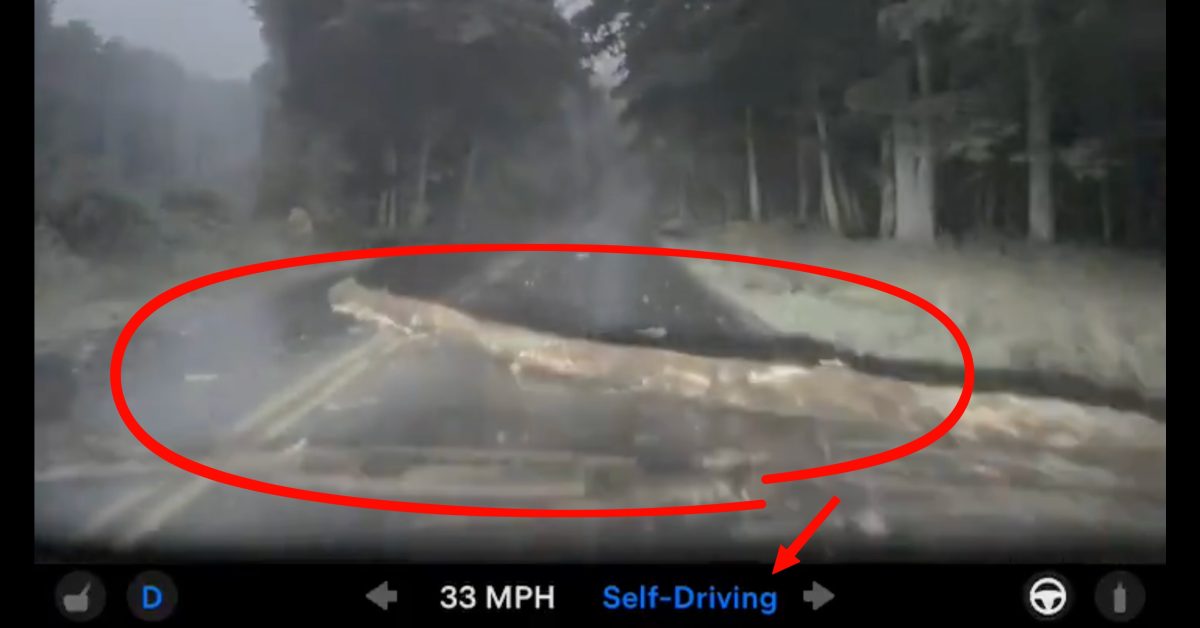
According to Electrek, a Tesla operating Full Self-Driving v14.1 Lite reportedly drove over a log across a wet, foggy rural road at about 32 mph without braking or swerving. The vehicle was using older Hardware 3, while the software was a compressed version of a model designed for newer hardware.
The important lesson is not that AI is useless. It is that automation must be deployed with clear limits, active supervision and a response plan for situations the system does not understand.
What Happened
A Tesla owner shared dashcam footage showing the vehicle approaching and driving over a large log lying across the lane. The report said the car did not slow down or avoid the obstacle. The video attracted more than 800,000 views, according to Electrek.
The vehicle was reportedly a Hardware 3 model running Tesla’s FSD v14.1 Lite software. The article described this version as a compressed adaptation of a newer model designed for Hardware 4. It also reported that Hardware 3 uses an AI computer with 8GB of RAM and substantially lower bandwidth than the newer platform. These technical limitations matter because an AI system’s performance depends not only on its software, but also on the hardware processing its decisions.
The article also described previous owner reports involving overheating, phantom braking, hesitation and brake stuttering on the older hardware. Some reports involved an “APP_w141_ECU_Thermal_Issue” fault above 90°C, with certain systems reportedly reaching 96°C, as reported by Electrek.
The debate that followed exposed a second problem: human complacency. The driver should have continued watching the road, but the system should also have identified an obvious obstruction. When automation handles normal situations smoothly, people can become less alert precisely when close attention is most important.
“Two things can be true: I should have been paying attention but the car definitely should have stopped.” — statement quoted in Electrek
Why This Matters for Malaysian SMEs
Many Malaysian SMEs are now introducing AI into daily operations. You may use a chatbot to answer customer questions, an AI tool to draft quotations, software to screen job applicants, or automation to transfer online orders into your accounting system. These tools can work well for routine requests, but unusual cases can expose weaknesses that are invisible during normal operation.
Consider a Klang Valley wholesaler using AI to classify incoming orders. Most customers may submit standard product codes and quantities. One customer, however, may send a WhatsApp message containing a photo, mixed Malay and English, an urgent delivery request and an old product code. If the system confidently assigns the wrong item, the result could be a failed delivery, warehouse confusion and an unhappy customer.
A Penang manufacturer may use sensors and AI alerts to monitor machines. The system could correctly recognise common vibration patterns but miss a rare combination caused by a loose component and high humidity. A Johor service company may automate technician scheduling, only to find that the software assigns a job in an impossible travel sequence because it does not understand a local road closure, festival crowd or ferry timetable.
These examples are not arguments against automation. They show why you should treat AI as an operational assistant rather than an unquestionable decision-maker. The Tesla incident demonstrates the danger of allowing a system to appear capable enough that the human supervisor stops checking its work.
Practical AI Controls for Your Business
| Risk area | What you should do | Example for an SME |
|---|---|---|
| Unusual input | Send low-confidence cases to a person | Review orders with unclear product codes |
| Incorrect output | Require approval before action | Approve quotations before sending them |
| System failure | Maintain a manual fallback process | Keep a spreadsheet or paper dispatch list |
| Changing conditions | Review rules and performance regularly | Update delivery zones after road changes |
| Accountability | Assign a named owner for each workflow | Make the operations manager responsible for automation checks |
What You Should Check Before Automating
First, identify the point where an error becomes serious. An AI-generated social media caption may require only a quick edit. An automated payroll calculation, customer refund, safety instruction or delivery address requires a stronger approval process.
Second, define confidence thresholds. If an AI tool is highly certain that an invoice matches a purchase order, it may proceed automatically. If the supplier name, tax information or amount differs from the expected record, the item should move to human review.
Third, test unusual scenarios before launch. Do not test only clean examples. Include incomplete forms, duplicated records, spelling mistakes, code-switching between Bahasa Malaysia and English, images, missing attachments and contradictory instructions. Your system should have a safe response when it cannot decide.
Fourth, monitor what happens after deployment. Keep a simple error log showing the date, workflow, issue, business impact and correction. Patterns will emerge. You may discover that an AI assistant frequently misreads certain Malaysian address formats or that a sales bot gives inaccurate delivery commitments on public holidays.
The Bigger Picture
The Tesla story reflects a wider shift in technology. Modern AI systems are becoming more capable, but capability is not the same as reliability in every environment. A model trained or optimised for one set of conditions may behave poorly when it encounters different hardware, unusual inputs or unexpected surroundings.
For SMEs, this means automation should be designed around resilience rather than excitement. A good workflow is not one that removes every human step. It is one that removes repetitive work while preserving human judgement where the consequences of an error are significant.
You should also be careful with the word “autonomous”. In business software, a system that drafts a response is not the same as one that sends it. A tool that recommends a reorder is not the same as one that places the purchase. A dashboard that detects a possible machine fault is not the same as one that shuts down production.
When selecting an automation platform, ask what happens when the system is uncertain, unavailable or wrong. Ask whether you can view an activity history, reverse an action, set approval rules and export your data. These questions are more valuable than simply asking whether a product includes AI.
The practical takeaway is straightforward: use AI to improve speed and consistency, but do not let smooth performance create blind trust. Keep people attentive, establish clear limits and build a fallback for the moment when the digital system meets its version of a log in the road.
Ready to Streamline Your Operations?
Technology moves fast. Your operations should keep up. AutoRunBiz builds AI systems that run your daily workflows — from WhatsApp order capture to accounting. Book a free 15-min ops audit →