
When Your Business Work Is Spread Across Too Many Tools
As a Malaysian SME owner, you may spend your day moving between WhatsApp messages, emails, spreadsheets, documents, browser tabs and customer enquiries. The work itself may be manageable, but the constant switching creates delays. A simple task such as preparing a product description, checking a document or planning a social media post can take longer than expected because the information is scattered across different places.
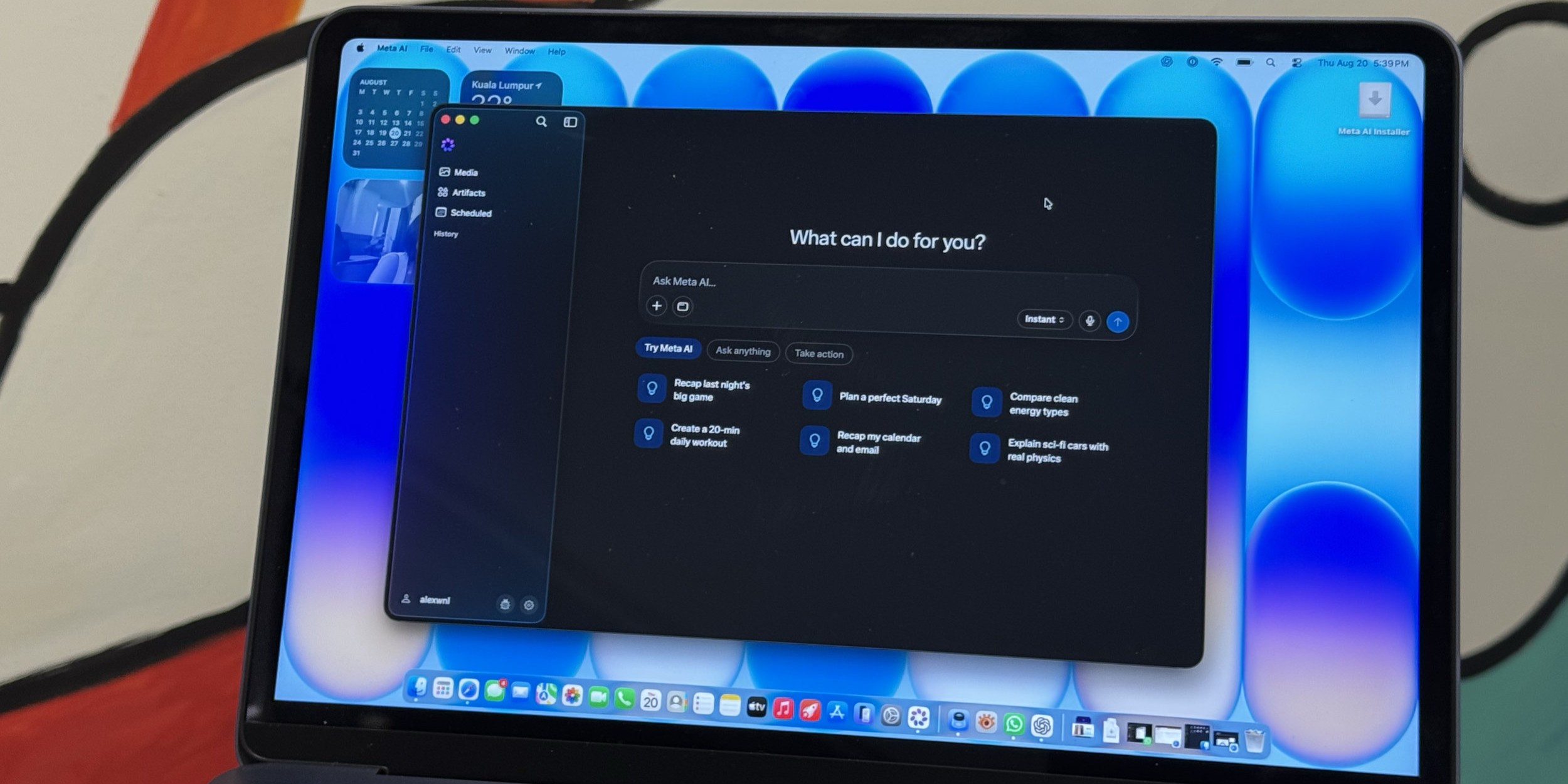
Meta AI’s first desktop app for Mac points towards a more practical way to use an AI assistant: directly from your computer, alongside the work you are already doing. According to the source article, the app is designed to help users write, research, brainstorm and interact with content on their screen through a desktop experience rather than relying only on a mobile app or website. Source: SoyaCincau
TL;DR: A desktop AI assistant can help you draft, summarise, organise and review routine business work without constantly changing applications. For an SME, the value comes from using it as a controlled helper for repetitive tasks, while you remain responsible for decisions, customer promises and sensitive information.
What This Means
A desktop AI app is an assistant that sits closer to your everyday computer workflow. Instead of opening a separate browser tab for every request, you may be able to call the assistant while working on a document, researching a topic or planning content. The source article describes Meta AI’s Mac app as supporting tasks such as writing, brainstorming and research, giving users a more direct way to work with an AI assistant from the desktop. Source: SoyaCincau
In plain language, you can think of it as a junior assistant for first drafts and first checks. You might ask it to turn rough notes into a customer reply, suggest questions for a supplier meeting, summarise a long webpage or create several headline options for a campaign. It can reduce the blank-page problem and help you move from an idea to a usable starting point.
However, it is not a replacement for your judgement. AI can misunderstand context, produce inaccurate details or write in a tone that does not suit your business. You should treat its output as a draft. Check names, dates, product specifications, delivery commitments, legal wording and any statement that could affect a customer or supplier.
Key insight: The practical benefit is not asking AI to run your business. It is removing small delays from the work you already understand.
How This Applies to Malaysian SMEs
1. Faster customer communication. If you operate a retail, service, food, education or home-based business, you probably answer similar questions repeatedly. You can provide the AI assistant with your approved information and ask it to draft a clear reply in English, Bahasa Malaysia or a more casual style. For example, you could ask for a polite response explaining booking steps, operating hours, delivery areas or required documents. You should still verify the details before sending, especially when the reply includes appointment times or service conditions.
2. Better use of staff notes. A salesperson may return from a customer visit with messy notes. A supervisor may have voice notes from a team discussion. You can convert those materials into a follow-up list, meeting summary or internal task list. This is useful when your team is small and one person handles several roles. Instead of leaving information buried in chat messages, you can turn it into a structured format that someone can act on.
3. More consistent marketing content. Many Malaysian SMEs know they should post regularly but struggle to create content around daily operations. A desktop assistant can help turn one product update into several formats: a Facebook post, an Instagram caption, a short email, a FAQ entry and a sales team talking point. You can specify your audience, language and tone. A human should then review the content so it reflects your actual offer and does not make claims you cannot support.
4. Easier document preparation. You may need to prepare quotations, service explanations, onboarding notes, job descriptions or internal procedures. AI can help organise your rough points into headings and identify missing information. For a small team, this can make your processes easier to repeat. Be careful when working with personal data, confidential contracts, identity documents or financial records. Do not paste sensitive information into an AI tool unless you understand its privacy controls and your organisation has approved the practice.
5. Support for bilingual work. Malaysian businesses often communicate across English, Bahasa Malaysia and other languages. An AI assistant can help produce a first translation or adjust a message for a different audience. This is useful for internal announcements, product explanations and customer education. Still, you should have a fluent person check wording where accuracy, politeness or industry terminology matters.
A Simple SME Workflow to Try
You do not need to introduce AI across every department at once. Start with one repetitive workflow that is easy to check. The following example shows how a small business could use a desktop assistant without handing over control of the process.
| Business task | AI assistant role | Human check |
|---|---|---|
| Customer enquiry | Draft a reply from approved information | Confirm availability, timing and commitments |
| Weekly meeting | Turn notes into decisions and action items | Check owners and deadlines |
| Social media planning | Suggest content variations and captions | Check claims, images and brand tone |
| Internal procedure | Organise rough notes into steps | Test the procedure with a staff member |
For your first trial, choose a task that happens frequently and has a clear review step. Write down the information the assistant is allowed to use, the format you want and the person who approves the final output. This small amount of structure prevents the tool from becoming another source of inconsistent work.
Practical Takeaways
- Start with drafting, not decision-making. Use AI for first versions of messages, summaries and content ideas.
- Create approved reference notes. Keep current information about services, operating hours, delivery areas and frequently asked questions.
- Give precise instructions. State the audience, language, tone, length and required facts.
- Check every external message. Confirm names, dates, specifications, promises and contact details.
- Protect sensitive information. Avoid sharing confidential business, employee or customer data without an approved policy.
- Keep a human approval step. Decide who reviews content before it reaches customers or is added to an official document.
- Measure time saved. Compare how long a task takes before and after the new workflow.
- Teach staff what not to share. A short internal guide is better than assuming everyone understands AI privacy risks.
Questions to Ask Before Your Team Uses a Desktop AI App
- What business tasks are suitable for drafting or summarising?
- Which information must never be entered into the tool?
- Who owns the final review?
- How will you correct inaccurate or outdated answers?
- Which language and tone should customer-facing content use?
- Where will approved outputs be stored so your team can find them?
These questions matter because convenience can create confusion if your team uses different prompts, outdated information or unapproved wording. A basic process gives everyone a common standard.
The Bigger Picture
The arrival of a desktop AI assistant suggests that AI is moving closer to ordinary business routines. You may not experience it as a separate technology project. Instead, it may appear inside the tools you already use for writing, research, communication and planning. The source article’s focus on a Mac desktop app reflects this direction: AI assistance is becoming more accessible from the computer where many business tasks already happen. Source: SoyaCincau
For Malaysian SMEs, the long-term question is not whether AI can produce impressive text. The more useful question is whether your business has clear information, repeatable processes and sensible approval rules. An assistant works best when you can give it accurate source material and recognise when its answer needs checking.
Businesses that benefit most will likely be those that start narrowly, document what works and train people to use the tool responsibly. You can begin with one customer reply workflow or one weekly reporting task. If the results are reliable, expand gradually. Keep the focus on shorter response times, clearer communication and less repetitive work for your team.
A desktop AI app may become another everyday business tool, but its results still depend on how you use it. Give it good instructions, limit access to sensitive information and keep your experience in charge of the final decision. That is how a small team can gain practical support without losing control of its operations.
Ready to Streamline Your Operations?
Your business should run itself. AutoRunBiz deploys AI agents to automate your daily operations — WhatsApp orders, invoicing, customer follow-ups, and accounting. Book a free 15-min ops audit to see where automation fits your business →