
Why a Tiny Apple Update Should Make You Rethink Your Entire Workflow
If you run a business in Malaysia with a team of 1 to 50 employees, you know the value of momentum. You sit down at your desk or glance at your phone to reply to a quick customer message. You type a response, your thumb moves towards the send button, and then it happens – your finger strays just a few pixels to the left. Your music stops. Your screen jumps. The phone starts listening. A small flame of frustration ignites.
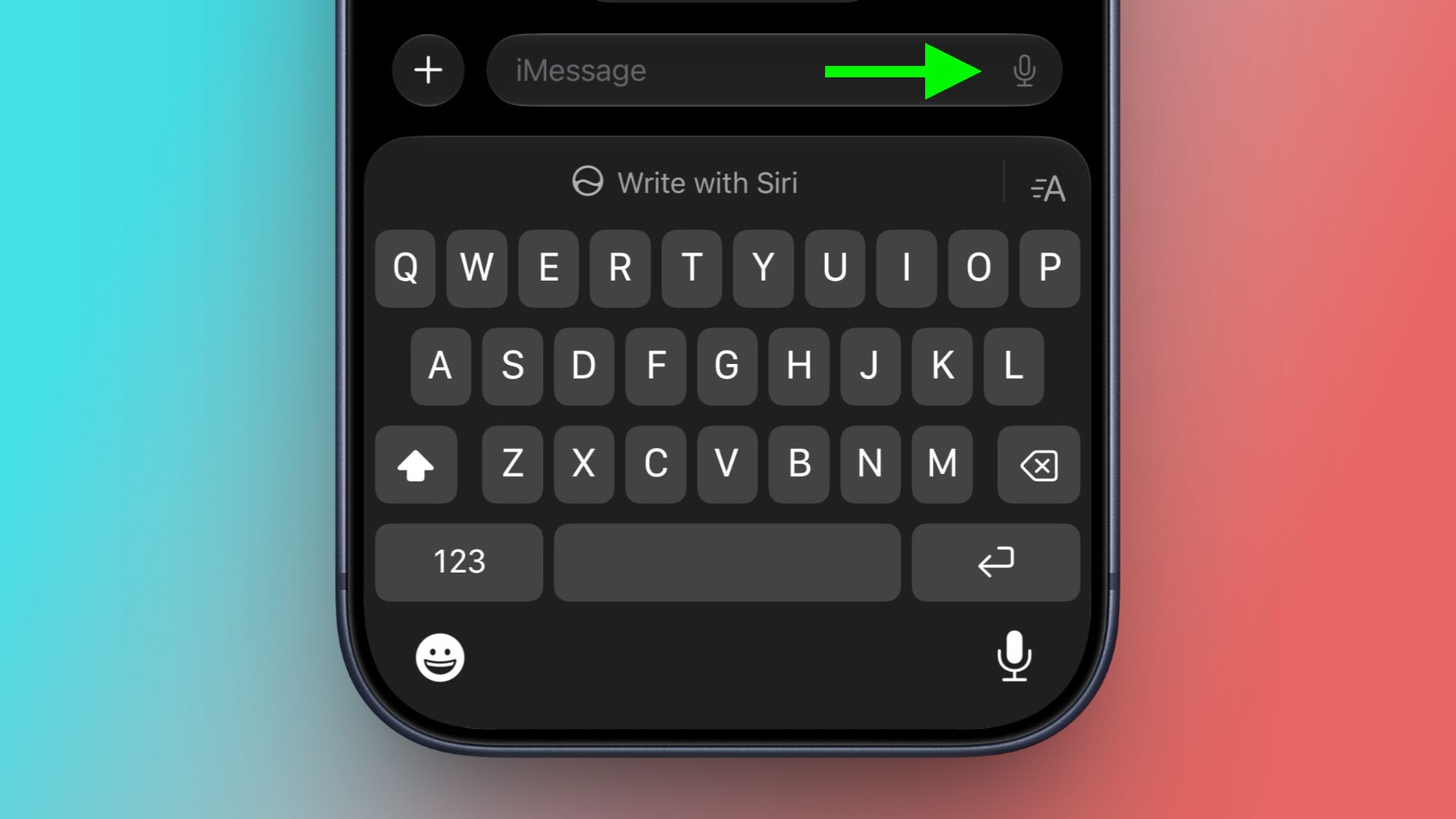
This tiny annoyance—accidentally tapping the dictation or voice message button in Messages—happens more than anyone wants to admit. The placement was so awkward that it even caught the ire of Justin Bieber, whose viral complaint about the button layout eventually reached Apple’s design team. The result is a change in iOS 27 as covered in detail by MacRumors.
Apple’s fix is deceptively simple. In the upcoming operating system, currently in beta, you can navigate to Settings > Apps > Messages > Show in Text Field and select None. The button vanishes. If you still want to send a voice message, you use the plus button instead. If you need dictation, it lives on the keyboard menu. The point is that the most common accidental action is no longer placed in the hot zone.
It is a minor quality-of-life tweak. But for an SME owner, it is a masterclass in operational efficiency. Let us break down why this matters for your business today.
What Actually Happened with iOS 27
To summarize the story: For several generations of iOS, the text field in Messages displayed a waveform icon for recording audio clips and a microphone icon for voice dictation. Both icons sat dangerously close to the very prominent send arrow. The design created a constant source of “fat finger” accidents. A stray tap would interrupt whatever you were doing, forcing you to dismiss the audio interface and regain your train of thought.
Pop star Justin Bieber publicly aired his frustration, claiming that a send button should not have “multiple functions” so close together. The post resonated widely. In iOS 27 and iPadOS 27 (currently in beta, expected September), Apple introduced a dedicated settings toggle that finally gives users control over the layout. You can choose between “Record Audio,” “Start Dictation,” or “None.” Choosing “None” removes the clutter entirely.
This is not a story about groundbreaking technology. It is a story about listening to feedback and removing friction. As a business owner, this is the exact mindset you need to apply to your own operations.
Why This Matters for Malaysian SMEs (Part 1: The Hidden Cost of Friction)
Imagine your day. You manage a small team in Kuala Lumpur, Penang, or Johor. Your communication likely runs on WhatsApp Business or iMessage. But the real friction is not just on your messaging app. It is in the tools you use to run your business.
Think about your accounts receivable process. Every time a staff member has to manually check if a payment has cleared, update a spreadsheet, and send a reminder email, they are performing a sequence of accidental taps. Each step is a chance for an error. Each context switch costs them time. Over a week, these micro-interruptions compound into hours of lost productive time.
“Apple did not build a faster phone. They just removed a button that was slowing people down. For your SME, the biggest gains often come not from adding new tools, but from removing the wasted steps in your existing workflows.”
The “dictation button” in your business could be anything. It might be the five extra clicks it takes to generate a monthly sales report. It might be the manual copy-pasting of customer data from your e-commerce platform into your accounting software. It is the small, repetitive task that everyone hates but accepts as “just the way things are done.”
Why This Matters for Malaysian SMEs (Part 2: Taking Control of Your Interface)
Malaysian SME owners are often forced to be accidental problem solvers. You are constantly fighting fires. But the best fire is the one that never starts. Apple’s move with iOS 27 shows that the most powerful interventions are often preventive.
You do not have to wait for your team to complain like a viral pop star. You can look at your business systems today and audit the friction. Ask yourself: What are the three most annoying, repetitive tasks my team does every week?
For many SMEs, the answer involves data reconciliation, manual invoicing, or chasing down approvals. These are the “audio buttons” of your business. They sit right next to the core function of your business—making money and serving customers—and they cause constant, draining interruptions.
This is where automation becomes your settings menu. Just as Apple gave users a toggle to hide the button, business process automation gives you the ability to hide the inefficiency. At AutoRunBiz, we help you find these exact friction points. We build the automated workflows that do the boring, repetitive, error-prone work for you.
Finding Your “Dictation Button”
Here is a simple exercise to identify the “dictation buttons” in your company. Look for tasks that share these traits:
- Frequency: Does this happen daily or weekly? Every day is a new chance to annoy your team.
- Repetition: Are you doing the exact same sequence of clicks or data entries? If a sequence is identical every time, it is a perfect candidate for automation.
- Disruption: Does this task pull your team away from high-value work? Like an unwanted voice recording interrupting your music, these tasks break concentration.
You might be surprised. A simple automated follow-up email sequence can save ten hours a week for your sales team. An automatic invoice reminder can improve your cash flow significantly. A synchronized inventory system can prevent a stockout disaster. These are not futuristic AI dreams. These are the problems you can solve today.
The Bigger Picture
The story of iOS 27 and the removed dictation button is ultimately a story about respect for the user. It is about acknowledging that small problems are still problems. Your employees are the users of your business systems. Your customers are the users of your brand experience. If their experience is filled with accidental taps and frustrating dead ends, they will disengage.
By taking the time to map your processes and eliminate the friction, you are doing more than just saving seconds. You are sending a signal to your team that their time and focus matter. You are building a business that is resilient, efficient, and ready to scale.
The button is gone on iOS 27. What is the button you need to remove from your business? At AutoRunBiz, we specialize in turning annoying manual workflows into seamless automated operations. Stop fat-fingering your business growth.
Ready to Streamline Your Operations?
Technology moves fast. Your operations should keep up. AutoRunBiz builds AI systems that run your daily workflows — from WhatsApp order capture to accounting. Book a free 15-min ops audit →