
Your Phone Has Been Running Your Business. It’s Time Your Laptop Did the Talking.
You know the feeling. You are deep in an email on your laptop, cross-referencing an inventory sheet on another tab, when a client calls on WhatsApp. You fumble for your phone, the call starts, but you need to look up a specific product detail on your laptop screen. You have to awkwardly put them on speaker, hold the phone up to your ear, or find a headset. For the average Malaysian SME owner, this “context switch” happens dozens of times a day.
You are essentially running a complex business from a tiny 6-inch screen while your powerful workstation sits idle. This friction isn’t just annoying—it kills your focus, slows your response time, and makes you look less professional. The good news is this entire workflow can now disappear.
TL;DR: WhatsApp Web now supports audio and video calls directly from your browser. You can take calls, share your screen, transfer calls between devices, and benefit from noise suppression without ever touching your phone. For Malaysian SMEs glued to WhatsApp for operations, this is a massive efficiency upgrade.
What This Actually Means for Your Workflow
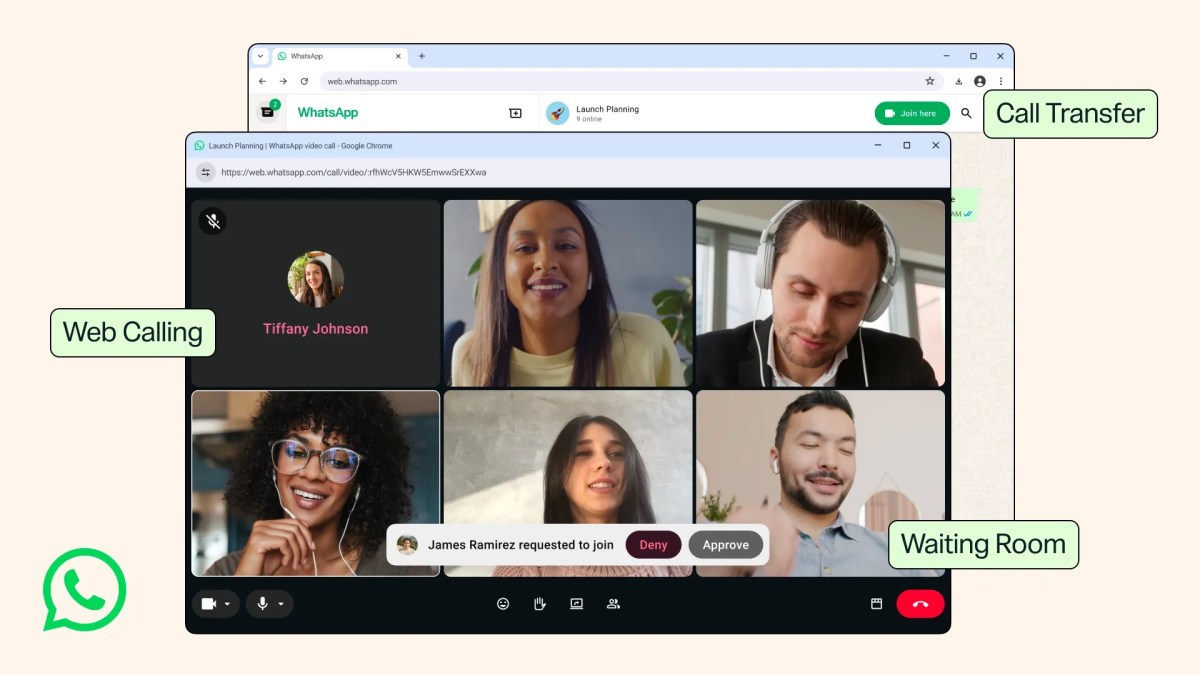
Previously, WhatsApp Web (web.whatsapp.com) was strictly for text chats. Now, Meta has brought the full calling experience to your browser. As reported by TechCrunch, here are the specific features landing on your desktop:
- Calls Tab: A dedicated tab now houses your call history and favorites, just like the mobile app.
- Screen Sharing: You can now show your screen during a video call. Perfect for walking a client through a document or troubleshooting software with your team.
- Call Transfer: You can seamlessly move a call from your desktop to your mobile phone without hanging up. Ideal for the “I’m heading out the door” moment.
- Waiting Rooms: When creating a group call link, you can enable the “Require approval to join” option to control who enters and manage participants. A key update for work calls.
- Background Noise Suppression: Filters out ambient noise from busy environments.
- HD Video: Video calls now start in high definition immediately, without the awkward few seconds of low quality.
How This Applies to the Malaysian SME Reality
1. The Remote Team’s New HQ. If your business runs on a hybrid or fully remote model—common for service and creative industries in Malaysia—WhatsApp is likely your main communication hub. Your sales staff, customer support team, and freelancers live in the app. The ability to initiate a video call, share a screen to walk a technician through a problem, or have a rapid team huddle without everyone needing a Zoom or Google Meet account is a clear win. It reduces the mental load of app switching and keeps your operations smooth.
2. Customer Service Without the Handcuffs. This is the big one for retail and service-based SMEs. You likely use WhatsApp Business to manage customer queries. When a text conversation gets complex, you can now click to call directly from your browser. While you are on the call, you can pull up the customer’s order history, check inventory on another tab, or prepare a quotation. Your phone is no longer a bottleneck. The call transfer feature is a godsend here. If a customer calls the main line and the query is for a specific department head who is about to leave for a delivery, you can transfer the call straight to their mobile without the customer experiencing any interruption. It gives you the flexibility to operate like a larger company.
3. Professionalism in Chaos. The waiting room feature adds control to your virtual meetings. For SMEs hosting product training, supplier briefings, or client demos, this prevents awkward interruptions from unwanted entrants. More importantly, the background noise suppression is tailor-made for the Malaysian context. Whether you are taking a call from a bustling showroom, a noisy kopitiam during a working breakfast, or your home office with construction outside, this feature helps maintain your professionalism. Your clients don’t need to hear the “background music” of your reality.
“The most valuable business tool is the one your customers and team actually use. By making web calls robust and feature-rich, WhatsApp has turned your browser into the most powerful business phone you didn’t know you had.”
Practical Takeaways: How to Use This Right Now
Here is your simple checklist to start using this feature today:
- Update Your Web Client: Go to web.whatsapp.com and scan the QR code. The Calls tab should appear automatically.
- Test a Call: Call a colleague or a second device. Test the audio quality and video clarity with the new HD feature.
- Explore Screen Share: During a test call, find the screen share button. Practice sharing a specific application window versus your entire desktop for better privacy.
- Create a Group Call Link: Tap the Calls tab, create a call link, and enable the “Require approval to join” option. This is your new virtual meeting room.
- Educate Your Team: Tell your employees and assistants about this feature. It saves them from picking up their phone while working on their computer.
Old Workflow vs. WhatsApp Web Calls Workflow
| Scenario | Old Way (Phone + Laptop) | New Way (Web Calls) |
|---|---|---|
| Client Call + Data Lookup | Phone pressed to ear, typing with one hand | Hands-free call, browsing data on same large screen |
| Team Technical Support | Typing endless chat instructions or “send screenshot” | Video call with live screen share to demonstrate |
| Calling from a Noisy Environment | Apologizing for the background noise | Noise suppression filters out the ambient chaos |
| Leaving the Office Mid-Call | End the call, call back on mobile | Seamless one-click call transfer to mobile |
| Hosting a Group Client Meeting | Uncontrolled entry, potential “raid” disruptions | Waiting room manages entry, host controls the room |
The Bigger Picture: The Consumerization of Your Office
This update is part of a larger trend. Meta is aggressively turning WhatsApp into a complete communication platform. Features like usernames (currently being tested), community groups, and now professional-grade web calls are blurring the lines between consumer apps and enterprise business tools.
For your SME, this means the tools of the future will be simpler and more integrated. You don’t need to train clients on a complicated CRM or a new meeting app. You meet them where they already are: on WhatsApp. By mastering these updates, you are not just saving a few seconds per call. You are building a more responsive, professional, and efficient business infrastructure, one browser tab at a time.
Now, put the phone down and get off the phone. Your business is calling on your laptop.
Ready to Streamline Your Operations?
Your business should run itself. AutoRunBiz deploys AI agents to automate your daily operations — WhatsApp orders, invoicing, customer follow-ups, and accounting. Book a free 15-min ops audit to see where automation fits your business →